

 13 September 2021
  Upd: 30 June 2026
  116 min
  32134 views
 Check all the newest updates and features for EvenBet Poker software.
Version 26.5.2
15.05.2026
Core
- Table-Level Cashout Insurance Settings: Cashout insurance can now be configured individually for each poker table. Operators can define conditions such as minimum player equity, minimum pot size, participant limits, and whether insurance can be offered again after being declined. This provides greater flexibility in balancing player protection with game pace and helps reduce unnecessary interruptions during hands.
- Tournament Void Management: Administrators can now void completed tournaments, revoke awarded prizes, and refund tournament fees through a dedicated tournament management interface in Backoffice. This provides a centralized and controlled way to handle tournament cancellations, corrections, and exceptional operational cases.
Web Client
- Personalized Victory Pop-Up: The tournament victory pop-up now displays the winner’s nickname, creating a more personal and shareable celebration screen after a tournament win. This feature is now also available in the browser client.
Desktop and Mobile Clients
- Multi-Entry Tournaments — Combined Payment Support: Players can now use a combination of tickets, tournament money, and real-money balance when registering for multi-entry tournaments. The registration window automatically calculates the maximum number of available entries based on all available resources and provides a clear payment breakdown before confirmation. Additional warnings have also been added when the value of a ticket exceeds the tournament entry cost, helping players make more informed registration decisions.
Clubs
- Club Results Dashboard: A new KPI dashboard has been added to the client application, providing an aggregated view of key club performance metrics such as fees, winnings, insurance, and jackpot contributions. Data is available across multiple time periods, including today, this week, last week, and lifetime totals, allowing club owners, managers, and agents to monitor performance directly from the management interface.
Payments
- New Payment System — Surfgate: Surfgate has been integrated as a new payment system, expanding the range of available payment options for operators and players.
- Skin-Specific Deposit and Cashout Limits: Deposit and withdrawal limits can now be configured separately for each skin. This allows operators to apply different payment restrictions across brands while maintaining a shared default configuration where needed
Digest 26.5.1
05.05.2026
Desktop and Mobile Clients
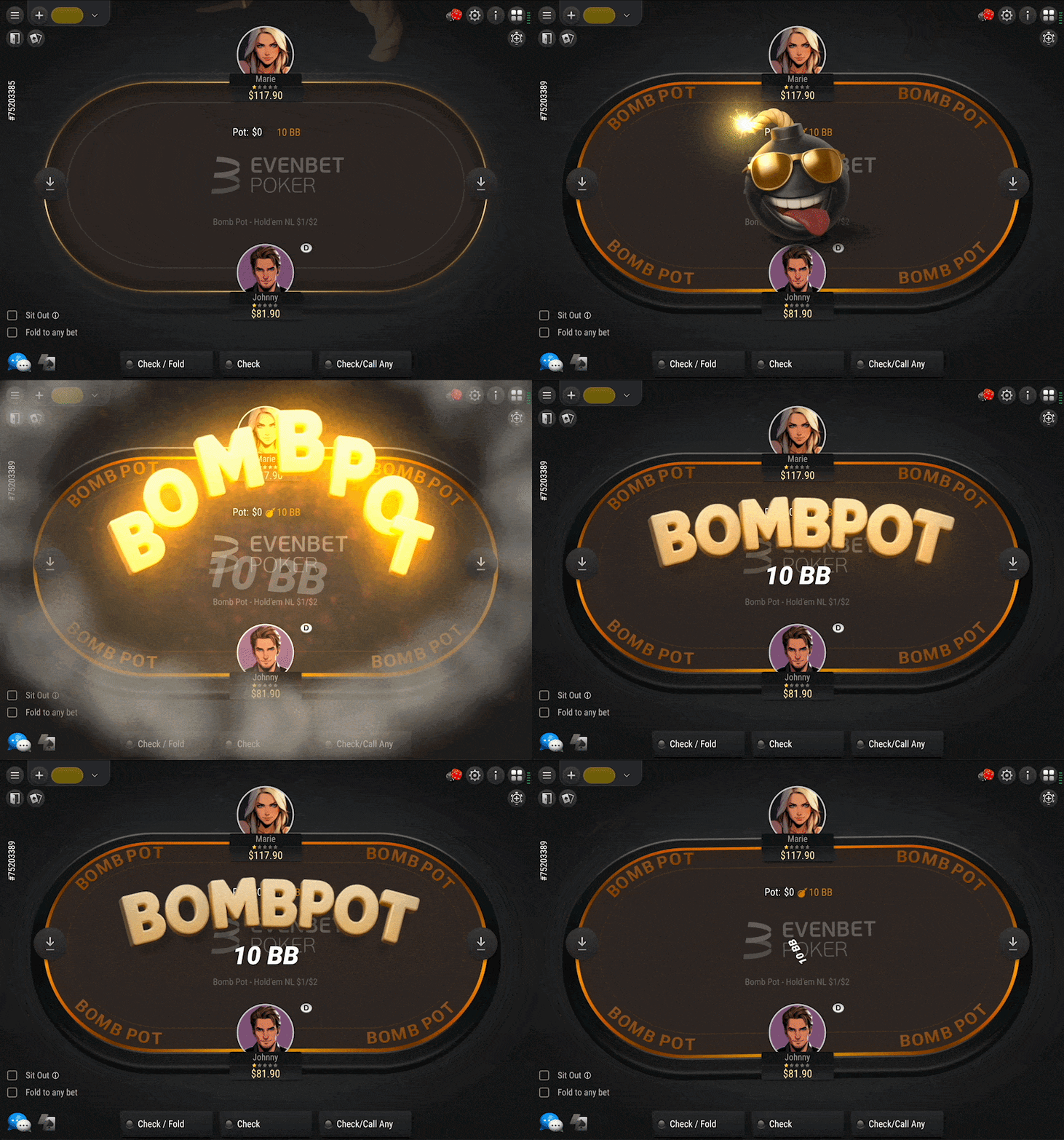
- Brand-New Bomb Pot Animation: Bomb Pot activation now features a fully redesigned animation, adding more visual impact and excitement when the mode starts.
- Personalized Victory Pop-Up: The tournament victory pop-up now displays the winner’s nickname, creating a more personal and shareable result screen after a tournament win.
Desktop Clients
- App Update Reminders: When an update is available, the player receives a system notification and can launch the update directly. This helps keep clients up to date without requiring manual checks.
EvenBet Spins
- Report Suspicious Activity: Players can now report suspected cheating directly from the table. Reports include key player and game details, helping support and security teams review suspicious cases faster and more accurately.
Clubs
- Level Structure Preview for Tournaments: MTT and SNG creation forms now include a quick preview of the selected level table. Users can review the full blind and ante structure before creating a tournament, making setup clearer and reducing configuration mistakes.
Back-Office
- Group Entry Messages: Players can now automatically receive targeted messages when they join a specific player group. This enables more timely, personalized communication and improves onboarding and engagement workflows.
Casino
- New Casino Provider — Vegas Software: The Vegas Software aggregator has been integrated, expanding the casino content portfolio with access to Dragon Gaming titles.
Promo Engine
- Auto-Hide Completed Promos: Administrators can now define how long completed promotions and leaderboards remain visible in the client after they end. This helps keep promo sections clean and up to date without requiring manual removal of expired campaigns.
Version 26.4.2
15.04.2026
Core
- New Stack Transfer Modes for Phased Tournaments: Phased tournaments now support two different ways of transferring chips to the final stage when a player qualifies multiple times. Operators can choose whether only the player’s largest stack advances, or whether all qualifying stacks and accumulated bounties are combined into a single final-stage stack. The selected policy is displayed in Tournament Info, helping players clearly understand how their final stack is calculated.
Web, Desktop, and Mobile Clients
- Custom % Pot Pre-Flop Buttons: Players can now configure custom percentage-of-pot values for pre-flop quick bet buttons. This provides greater flexibility for pre-flop sizing and allows faster decision-making during gameplay.
- Pre-Flop Bet Multipliers: New multiplier-based quick bet options have been added for pre-flop actions. Players can use predefined raise multipliers or set their own custom values for raises and 3-bets, enabling more personalized and efficient betting controls.
Desktop and Mobile Clients
- Updated Tournament Info for Late Registration and Add-On Stages: Tournament Info now displays separate level durations for post-late-registration and post-add-on stages whenever they differ from the standard level time. This gives players clearer visibility into tournament structure changes directly within the main tournament information section.
Evenbet Spins
- Admin Pop-Up Notifications: Important administrator messages — including upcoming tournament deactivation notices and other announcements sent through the server messaging system — can now be displayed as pop-up notifications both in the lobby and at tables. This improves visibility of critical operational information for players.
- Tournament Cancellation Notifications: New pop-up notifications now inform players when tournaments are canceled due to server failures, manual cancellation, or unmet start conditions. Notifications are shown both in the lobby and at tables, including details about the cancellation reason and when the player will leave the table.
Back-Office
- Multi-Phase Tournaments — Restrict Additional Qualification Attempts: Operators can now prevent players who have already qualified for a phased tournament final from entering additional qualifying Phase 1 tournaments linked to the same final. The restriction can be configured per tournament or enabled globally across all phased tournaments.
- Customer.io — Sports Betting Activity Attributes: New sports betting activity attributes have been added to Customer.io integrations. These include the player’s latest sports bet date, betting performance metrics, and total betting amounts over 7-day, 30-day, and lifetime periods, enabling more advanced segmentation and player engagement campaigns.
Casino
- Alternar — Free Bet Support: The Alternar sportsbook integration now supports free bets, including activation, cancellation, and retrieval of free bet balances. This expands promotional capabilities and allows operators to offer sportsbook bonus campaigns more flexibly.
Payments
- New Payment System — SQPay: SQPay has been integrated as a new payment system, expanding the range of available payment options for operators and players.
Promo Engline
- Automatic Leaderboard Hiding After Campaign Completion: Leaderboards can now be hidden automatically after a promo campaign ends. Operators can define how long completed leaderboards remain visible in the client or set a manual visibility end date when configuring the leaderboard. This reduces the need for manual cleanup and helps keep the leaderboard section relevant and up to date.
Version 26.4.1
03.04.2026
Core
- Tournament Completion Event Updates: Tournament-related events now include additional bounty-related information. Tournament completion data contains the bounty fee amount, while player win events now also provide details about secondary prizes, prize currencies, and bounty rewards. This gives external systems more complete tournament payout information for reporting and integrations.
Web, Desktop, and Mobile Clients
- Tournament Buy-in Filter: Tournaments can now be filtered by predefined buy-in ranges such as Freeroll, Micro, Low, Medium, and High. The filter takes into account the full entry cost — including buy-in, fees, and bounty — helping players more easily find tournaments that match their preferred stake level.
Web Client
- Telegram Login Support: Players can now sign in using Telegram, providing a faster and more convenient login experience.
Desktop and Mobile Clients
- New In-Game Sound Effects: New sound effects have been added for key gameplay actions, including card dealing, countdown timers, game mode switching, and other in-game events. The feature enhances immersion and can be enabled upon request.
Evenbet Spins
- Automatic Logout on Inactivity: Players are now automatically logged out after a period of inactivity to improve session security. By default, the session expires after 15 minutes, with a warning displayed one minute before logout.
Back-Office
- Affiliate Transfers — Bonus Balance Reset: Bonus balances can now be automatically cleared when transferring funds from a player account in Affiliate Back-Office. This helps ensure that bonus funds are not retained when real-money balances are withdrawn. The feature can be enabled upon request.
- Localized API Responses: API responses — including validation errors and system messages — can now be localized and managed through the Localization section in Back-Office. This allows operators to provide more consistent multilingual integration experiences.
Payments
- FinAxis Integration Update: Payment requests sent through the FinAxis integration now include the player’s country information, enabling more accurate routing and processing based on billing region.
Promo Engine
- Max Buy-In for Tournament Count Tasks: Tournament-counting promo tasks now support a maximum buy-in limit, allowing operators to define an upper stake threshold for tournaments that qualify toward task progress.
- Localized Promo Notifications: Promo notification messages now support localization for campaign names, reward descriptions, and related content. Players see notifications in their selected language, with automatic fallback to default values when translations are unavailable.
Version 26.3.2
15.03.2026
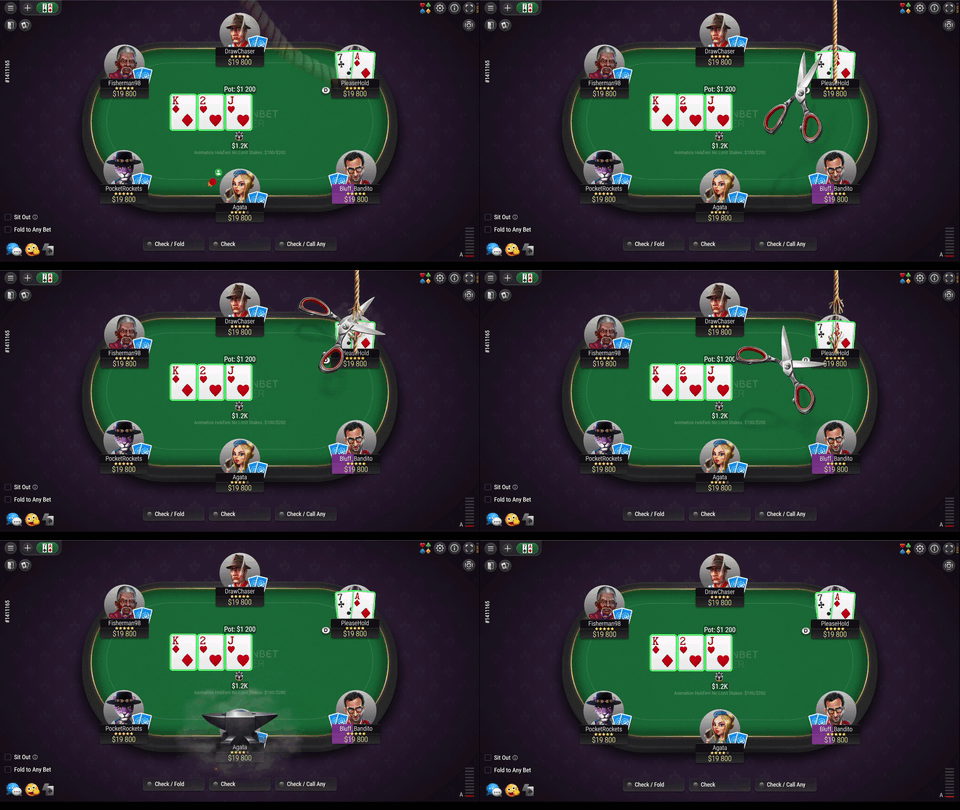
New Throwable Animations
A new set of interactive animations — including gas mask, anvil, cake, and champagne — has been added for table interactions. These visual effects allow players to react more expressively and enhance overall engagement. The feature can be enabled upon request.
Web Client
- Tickets Shortcut in Poker Lobby: A Tickets button has been added next to the Cashier in the poker lobby. It appears when a player has active (non-expired) tickets and provides quick access to the Tickets section, where full details are available. Ticket information updates automatically, ensuring accurate visibility.
Desktop and Mobile Clients
- All-in or Fold — Remove Chips Popup Update: The Remove Chips popup on All-in or Fold tables has been improved for better clarity. It now clearly explains when manual withdrawal is available, how auto-withdrawal works, and shows a confirmation message after changes are applied.
- Tournament Buy-In Filter: A new buy-in filter has been added to tournaments, grouping events into categories such as Freeroll, Micro, Low, Medium, and High. The filter takes into account all cost components (buy-in, fee, bounty) and is shown when applicable, making it easier for players to find tournaments within their preferred stake range.
Clubs
- Club Public ID Management: Club public IDs can now be updated in Backoffice, allowing operators to maintain consistent identifiers across platforms. Each ID must be unique and numeric, and all changes are logged for transparency and control.
- Call Timer Settings in Game Creation: New timing options have been added to the Create Game form in Clubs, allowing operators to define how long players must remain at the table under certain conditions. This helps prevent players from leaving immediately after a win and reduces potential issues caused by early exits or disconnections.
API
- Bad Beat Jackpot Data in Balance and Game Events: Balance operations and game completion events now include additional data related to the Bad Beat Jackpot. This includes the accumulated jackpot amount and the portion of rake contributed to it during a player’s session. The update provides clearer visibility into how jackpot contributions are formed and tracked.
- Improved Transaction Identification for Tournament Closures: Tournament-related balance responses can now include a unique transaction identifier instead of a default placeholder value. This improves compatibility with external systems and helps ensure proper validation and tracking of transactions on the integration side.
- Flexible Promo List Sorting in API: Promo data can now be sorted using multiple criteria, such as display order and current status. This allows client applications to present promotions in a more structured and customizable way.
Casino
- AI-Based Game List Sorting: Casino game lists can now be automatically sorted using AI-driven recommendations. When enabled, the system prioritizes games based on player behavior and relevance, improving discovery and engagement. Operators can control how many recommended games are shown, while external sorting requests can still override the default AI order when needed.
Payments
- New Payment System: FinAxis.
- Autofill Payment Fields from Player Profile: Payment forms can now automatically use player profile data — such as name, phone number, and email — to prefill required fields. When this information is already available, it can also be locked to prevent editing. If some data is missing, players can enter it during the payment process, and it will be saved to their profile for future use. This reduces friction and speeds up deposits.
Promo Engine
- Leaders Tab Renamed to Leaderboards: The Leaders tab in the client has been renamed to Leaderboards to ensure consistent terminology across the platform.
Version 26.3.1
03.03.2026
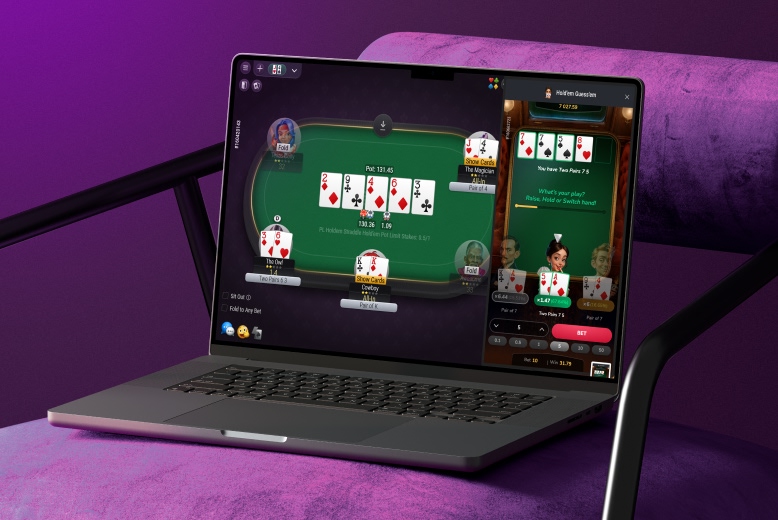
New Side Game: Hold’em Guess’em
A new single-player casino side game available alongside poker tables, where players choose one of several Texas Hold’em hands and bet on which one will win. The game unfolds across flop, turn, and river stages, with dynamically updated odds and potential payouts at each step, allowing players to adjust or keep their bets throughout the round.
Baccarat
- Sound Effects Added: The Baccarat side game now includes sound effects that enhance immersion and player engagement. Sounds are played for key actions such as countdown timer, bets, card dealing, chip movements, wins, and round transitions. Players can enable or disable sound directly within the game, with sound turned off by default.
Core
- Session Start Indicator in Balance Requests: Balance-related requests now include an indicator that marks the first transaction of a player session at a table or in a tournament. This helps external systems correctly identify session start events and improves tracking of player activity and transaction flows.
Web, Desktop, and Mobile Clients
- Intercom Support Chat Integration: Support chat integration has been added, allowing operators to connect and configure in-client communication with players. This enables faster support responses and improves overall user experience.
- Fast Fold — Waiting for Players Indicator: Players now see a “Waiting for players…” message when seated alone at a Fast Fold table. This clearly indicates that additional players are required before the game can start.
- Multi-FlightTournaments — Final Phase Buy-in Display: In phased tournaments, the final phase now displays the same buy-in as earlier stages. Although qualified players do not pay again, showing the value improves consistency and helps players better understand tournament structure.
EvenBet Spins
- Tournament Info at Table: Players can now access full tournament details directly from the table interface, including buy-in, fees, multiplier, prize pool, and other key parameters. This improves transparency and allows players to quickly review tournament conditions without leaving the game.
Back-Office
- Rummy Setting Rename for Clarity: A setting related to opponent discard visibility has been renamed to improve clarity and better reflect its actual behavior.
Casino
- New Casino Category — Fishing Games: A new Fishing category has been introduced for casino games, with support for provider-level mapping. This allows fishing-style games to be automatically grouped and displayed consistently across supported providers.
Anti-Fraud
- Incident Expiration Setting: A new setting allows defining how many days after the last update an anti-fraud incident is automatically marked as expired. The default period is 14 days, helping teams keep the incident list relevant and focused on active cases.
Payments
- Flexible Payment Forms: Payment forms can now be customized for selected providers, allowing operators to control which fields are displayed to players, define their order, and map them to user profile data. Fields can be auto-filled, hidden when already known, or used to update player information. This simplifies the payment flow and improves conversion.
Version 26.2.2
17.02.2026
New Side Game: Baccarat
A new Baccarat side game has been introduced, allowing players to place bets in parallel with poker gameplay — for example, while waiting for a hand to finish. This creates an additional engagement layer without interrupting the main game flow.
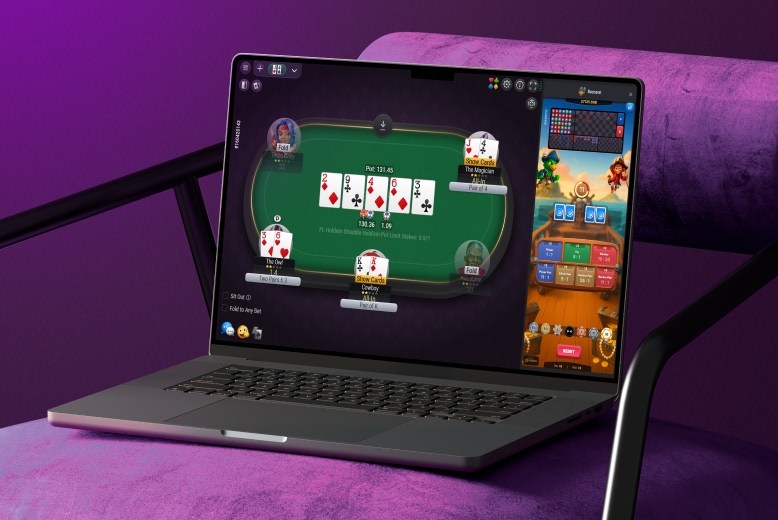
Baccarat is one of the most widely recognized and popular casino games, now presented in a refined, original design tailored for seamless integration into the poker experience.
Players bet on whether the Player or Banker hand will win, or if the round will end in a Tie. Each round follows classic Baccarat rules: two cards are dealt to both sides, and the hand closest to 9 points wins. All game actions, including dealing and result calculation, are fully automated.
In addition to Player and Banker bets, Tie and several side bets are available. With clear visuals, animated chips, and seamless multiplayer interaction, Baccarat delivers a fast-paced, casino-style experience that keeps players engaged between poker hands.
 Windows
  macOS
macOS  iOS
iOS  Android
 Core
- New Chat Message Event: A new event is now triggered for every chat message sent in the lobby or at tables. It includes message content and key player-related information, enabling better monitoring, moderation, and integration with external systems.
Desktop and Mobile Clients
- Tickets Shortcut in Poker Lobby: A new Tickets button has been added next to the Cashier in the poker lobby. It appears when a player has active tickets and provides quick access to the Tickets section, where full details are available. Ticket data is updated automatically, ensuring players always see updated information.
Clubs
- Clubs Page — Empty State Improvement: The Clubs page UI has been updated for players who have not joined or created any clubs. In this state, quick access buttons for creating or joining a club are now prominently displayed, making onboarding into clubs faster and more intuitive.
Back-Office
- Tournament Import from Files: A new import page allows administrators to create multiple tournaments by uploading JSON or CSV files. This simplifies bulk setup and reduces manual configuration. The feature is available from both the Tournaments section and the Tournament List for quick access.
API
- Insurance Fee Data in Balance Responses: Balance-related responses now include information about the total insurance fee paid by the player during a table session. This allows integrated systems to capture insurance-related costs without requiring additional requests or separate tracking logic.
Casino
- Provider Sorting Configuration: Operators can now control the display order of casino providers in Backoffice using a manual sorting field. The same sorting logic is also supported in integrations, allowing providers to be retrieved in a defined order based on key attributes. This ensures consistent provider ordering across both Backoffice and client applications.
Payments
- New Payment Systems: AgentPay, Paysecure, One1pay, ARNT247.
Promo Engine
- Tournament Knockouts Task — Group Selection: The Tournament Knockouts task now supports selecting specific tournament groups to define which tournaments count toward task progress. This enables more precise targeting and flexible configuration of tournament-based promotions.
Digest 26.2.1
02.02.2026
Web Client
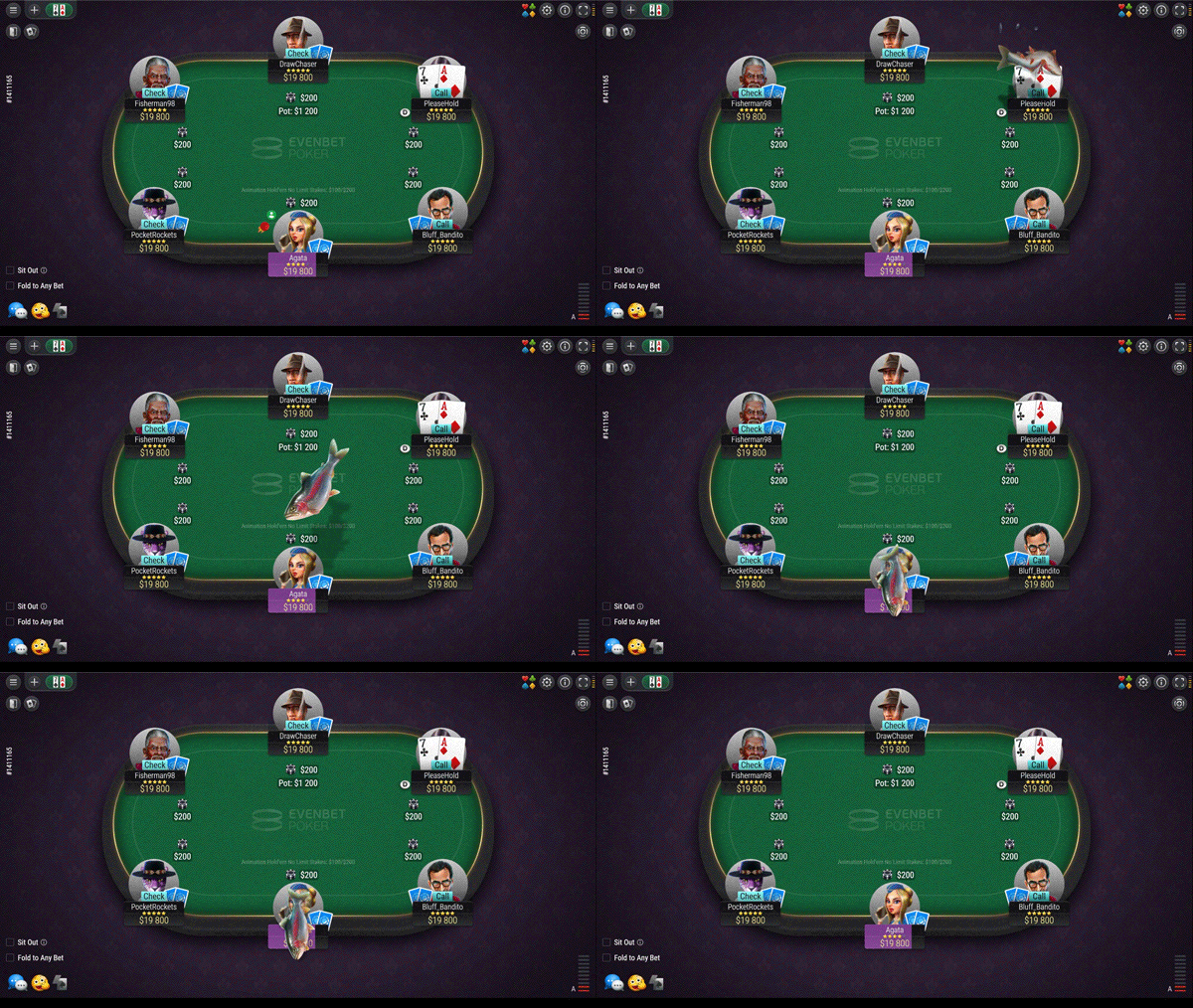
- New Throwables Animations: A set of new throwable animations — such as GG, Egg, Snowball, Fish, and others — has been added, allowing players to react and interact with each other at the table in a more expressive way. These animations enhance engagement and can be enabled upon request.
- Anti-Ratholing Countdown Timer: When anti-banking restrictions are active, the Buy-in window now displays a visible countdown timer showing how much time remains before the restriction is lifted. This helps players understand why certain buy-in options are temporarily unavailable and when standard rules will apply again.
Desktop Clients
- Remember Last Window Size: The desktop client can now remember the last used window size for both the lobby and game tables. When the application is reopened, the lobby and newly opened tables automatically use the previously saved dimensions, providing a more consistent user experience. This feature can be enabled upon request.
Desktop and Mobile Clients
- Improved Auto-Update Reliability: The auto-update system has been enhanced to deliver faster and more stable updates. The client now prioritizes update servers that have previously responded successfully and uses improved connection checks, reducing update failures and improving overall reliability.
Clubs
- Results Summary in Mobile Web Client: The Results page now displays Winnings and Fee at the top, alongside the existing Games counter. This provides a quick overview of key performance metrics without the need to scroll through detailed results.
Back-Office
- User Details — Skin and Affiliate in Header: The User Details header now displays the player’s skin and affiliate information alongside their nickname and ID. This makes it easier for administrators to quickly identify the account’s origin and associated partner.
Casino
- Softswiss — Settlement Handling Option: A new setting has been added to the Softswiss provider configuration, allowing operators to control whether a zero-amount settlement transaction is sent to the external wallet when a game round ends.
Payments
- Defexa & CoinPayments — Separate Cryptocurrency Options: Operators can now display each cryptocurrency as a separate payment option in the Cashier for Defexa and CoinPayments integrations. Each currency can be configured individually — including name, icon, limits, and display order — providing greater flexibility and a clearer user experience when selecting payment methods.
Promo Engine
- Poker Games Task — Table Selection: Poker Games tasks now support selecting specific tables where player activity counts toward task progress. This allows operators to run more targeted promotions tied to particular tables or game formats.
Version 26.1.2
17.01.2026
Core
- GA4 Event for Failed Deposits: A new Google Analytics event has been introduced to track unsuccessful deposit attempts. It uses the same parameters as the standard purchase event — including transaction amount, currency, transaction reference, and payment system — enabling more accurate monitoring of failed payment flows and drop-off analysis.
Web, Desktop, and Mobile Clients
- Tournament Prize Share Confirmation at Final Table: To improve transparency at the final table, players now confirm prize-sharing agreements after the hand is completed. The confirmation pop-up displays the final prize amounts. The deal is applied only if all eligible players confirm; otherwise, it is canceled and a notification informs the table that one or more players declined the agreement.
- Rummy — Discarded Cards Visibility: In Rummy games, cards taken from the discard pile now remain visible in the discarded cards list and are marked as taken. Picked cards are highlighted, allowing all players to clearly see which cards were taken and by whom, improving gameplay transparency.
- Ticket Value Warning on Tournament Registration: The ticket face value is now displayed in the tournament registration window. If a player attempts to register for a tournament with a buy-in or re-entry cost lower than the ticket value, a warning pop-up explains that the remaining value will be lost. The player can then confirm or cancel the registration.
Web Client
- Analytics for Share Prize Interactions: New analytics events have been introduced to track player behavior around the Share Prize feature. The system now records when a player opens or closes the prize-sharing panel, selects a specific distribution option (such as equal split, stake-based, ICM, or no deal), and confirms or declines the final agreement in the deal confirmation pop-up.
Back-Office
- Player Communication from User Details: A new Communication tab has been added to the User Details page. Administrators can now view the full communication history with a player and send messages — including email, SMS, and push notifications — directly from the player profile, using active templates configured in the notification system.
- “All Currencies” in Player Statistics: The player statistics section now includes an option to view data aggregated across all currencies. This provides a consolidated overview of activity and is set as the default display mode.
- Extended Access Control for Custom Reports: New access permissions allow administrators to view and manage all custom reports across the system. Without these permissions, users can only access their own reports or those shared with them, ensuring more flexible but controlled report management.
Casino
- New Casino Provider — JackTop (Betcore): The JackTop content provider by Betcore has been integrated, expanding the available portfolio of casino games with additional titles and gameplay formats.
Payments
- New Payment System — FlashPay: FlashPay has been integrated as a new payment method, expanding the available transaction options for operators and players.
- Localized Payment Method Labels: Payment method labels now support localization. Administrators can configure custom labels in Backoffice, and the cashier displays them according to the player’s interface language. If no localized label is defined, the default provider name is shown.
Promo Engine
- Unified Promo Entry Point in Client: In the client lobby, the Promotions and Leaders sections are now grouped under a single Promo tab. This creates a clearer, centralized entry point for all promo-related features and improves navigation. The update can be enabled upon request.
- Custom Notifications for Reward Events: Promo settings now allow administrators to define which notification template is used when a reward is created and when it is delivered. Instead of relying only on default system messages, a custom notification can be selected. The chosen message is sent to the player, displayed on the reward information page, and can be updated even while the promotion is active.
Version 26.1.1
07.01.2026
Desktop and Mobile Clients
- Anti-Ratholing Countdown Timer: When anti-banking restrictions are active, the Buy-in window now displays a visible countdown timer indicating how much time remains before the restriction is lifted. This helps players clearly understand why certain buy-in options are temporarily unavailable and when normal buy-in limits will be restored.
Back-Office
- Tournaments — Updated Pin-to-Top Logic: The pin-to-top period is now defined as a relative time interval before the tournament start, rather than as a fixed value. This ensures tournaments are correctly highlighted in the lobby ahead of each start time.
- Group Rakeback — Highest Rate Applied: When a player belongs to multiple groups with configured rakeback rates, the system now automatically applies the highest available rate. This guarantees that players receive the most favorable rakeback percentage assigned to them.
API
- Leaderboard API — Terms and Conditions Included: Responses that return leaderboard details now also include the related campaign’s terms and conditions. This allows integrated clients to display full promo information directly within the leaderboard interface without requiring additional requests.
- Tournament Rebuy and Add-On Fee Details in Balance Methods: Balance-related API methods now return additional information about tournament rebuy and add-on fees.
Payments
- New Payment Provider — MoneyGate: MoneyGate is now available as a payment provider, expanding the range of supported transaction options for deposits and withdrawals.
Promo Engine
- Skin-Based Promo Visibility in Back-Office: Back-Office administrators now see only the promo campaigns related to their assigned skin. Administrators with multi-skin access can still view all campaigns. This improves clarity and prevents cross-skin configuration errors.
Version 25.12.2
15.12.2025
Web Client
- Rakeback Widget — Expired Task Status: The Rakeback widget now reflects an Expired status for tasks that are not completed within the allotted time. When a task expires, it is not counted as completed, the player is returned to the last successfully completed level, and the next-level reward is not granted. This makes rakeback progression rules clearer and more transparent for players.
Web, Desktop, and Mobile Clients
- Bomb Pot UI Update: The Bomb Pot text label has been replaced with a compact icon. A tooltip appears on hover or tap, providing additional context while keeping the table interface cleaner and less cluttered.
Mobile Client
- Landscape Mode for Rummy Tables: Rummy tables in the mobile client now open in landscape mode, providing a more comfortable and spacious gameplay layout. When switching back to poker tables, the app automatically returns to portrait mode, while the lobby remains portrait-only for consistent navigation.
Back-Office
- Manual Adjustment of Wagering Requirements: Administrators can now manually adjust a player’s remaining wagering requirement from the User Details balance section. It is possible to fully reset the wagering requirement or reduce the remaining amount when needed. Any manual change is automatically synchronized across related wagering values, ensuring consistent balance calculations and simplifying support workflows.
Payments
- Transfer Restrictions for Players with Active Withdrawal Limits: Transfers between players and affiliates are now blocked if a player has an active withdrawal restriction applied by a promo campaign. When such a transfer is attempted, a warning message informs the affiliate that the player has an active bonus that would be canceled in case of withdrawal. This prevents accidental bonus cancellation and ensures consistent promo enforcement.
Promo Engine
- New Promo Task — Player Level: A new task type allows rewards to be issued when a player reaches a defined level. This enables level-based promotions and progression-driven reward mechanics within promo campaigns.
Version 25.12.1
02.12.2025
Core
- Rummy Table Game Speed Configuration: When creating Rummy tables, operators can now define the gameplay speed. Available speed options are taken from the system configuration, allowing projects to tailor the pace of play to their audience.
- Currency Visibility Control in Lobby and Cashier: A new currency-level option allows operators to control whether a specific currency is shown in the lobby currency selector and in the Cashier.
Web, Desktop, and Mobile Clients
- Bounty Tournaments — Knockout Animation: Bounty tournaments now feature a new knockout animation. When a player is eliminated, a visual effect highlights the knockout moment by removing the player’s avatar from the table.
- Mandatory Client Update for Outdated Versions: Outdated client versions are now blocked with a mandatory update prompt. Players can either download the latest version or close the application.
Mobile Clients
- PIN and Biometric Login Options: The mobile application now supports PIN-based login on both iOS and Android. On Android devices, users can also authenticate using biometric methods such as fingerprint or face recognition. This feature can be enabled upon request, providing a faster and more secure login experience.
Back-Office
- Tournament Profit in Statistics Report: The Tournament Statistics report now includes a Tournament Profit column, showing the overall financial result of a tournament by subtracting expenses from revenue.
- Extended User Import Capabilities: The user import feature now supports additional optional identifiers, allowing imported players to be linked to specific skins and external systems.
- Updated Current Rakeback Percent Logic: The Current Rakeback Percent field now reflects the effective rakeback rate by applying a clear priority order across different configuration levels. This ensures the displayed value always matches the rate actually applied to the player.
Payments
- New Payment Aggregator — KPay: KPay has been integrated as a new payment aggregator, expanding the available options for transaction processing.
Promo Engine
- Leaderboards — Last Updated Indicator: Leaderboards in the client now display a Last Updated field, showing when points were last refreshed and rankings recalculated. This gives players clearer visibility into how up to date the leaderboard data is.
Version 25.11.2
17.11.2025
Core
- New Balance Handling Priority for Bets and Winnings: A new balance priority option defines how bets and winnings are processed when both bonus and real-money balances are available. With this behavior, bets are deducted from the bonus balance first, and any remaining amount is taken from the real-money balance if needed. All winnings, however, are always credited to the real-money balance. This logic is supported for casino games and poker cash tables and provides a clear, predictable approach to balance management for both players and operators.
Back-Office
- Quick Date Range Filters Across Lists: Backoffice lists now include convenient preset date ranges such as Today, Yesterday, Last 7 Days, Last 30 Days, This Month, and Last Month. This allows administrators to quickly filter data by common periods across key sections, including casino transactions, compensations, confiscations, game search, incidents, casino game history, products, and leaderboards.
- Customer.io Attributes for Failed Deposit Tracking: New attributes have been added to enrich deposit-decline events sent to Customer.io. These include the date and time of the most recent declined or canceled deposit, as well as counters for total declined and canceled attempts. This enables more accurate, up-to-date segmentation and automation for deposit recovery campaigns.
- External ID in Tournament Player Lists: A new External ID column has been added to the Players of Tournament list, making it easier for administrators to identify, group, and manage players using external identifiers.
Anti-Fraud
- Enhanced Fraud Event Context Across Skins: Fraud-related events now include information about the skin associated with each incident participant. This allows incidents to be tracked more accurately in multi-skin setups.
Payments
- New Payment System — Kiwipayment: Kiwipayment has been integrated as a new deposit method, expanding the range of available payment options for players.
Version 25.11.1
07.11.2025
Core
- Updated Seating Events: Events related to players taking a seat at a table now include information about the amount of chips the player brought into the game. This enhancement improves tracking and provides clearer context for seat-entry actions across reporting and analytics.
Back-Office
- Tournament Statistics Report — New Type Filter: The Tournament Statistics report now includes a filter that allows administrators to view data separately for regular tournaments and Spin tournaments. This provides clearer insights and more precise performance analysis across different tournament formats.
API
- User Profile Response Expanded: Responses that return user profile information now include an indicator showing whether the account is marked as a test user. This helps external services distinguish real players from test accounts during integrations and reporting.
- Table Information Response Expanded: Responses that provide table details now include additional flags showing whether certain gameplay options are enabled — such as straddles, club-specific table mode, rabbit hunting, or anonymous play. These additions give integrated systems a clearer picture of table configuration and available features.
Payments
- Paystar — Locked Exchange Rate Option: A new setting allows the deposit amount to be calculated using the exchange rate captured at the moment the deposit request is made. This rate remains unchanged even if the final confirmation is received after several retry attempts, ensuring stable and predictable crediting for players.
- 0xProcessing — Destination Tag Support: A new multiselect option lets operators specify which currencies should display a “Destination tag” field in the cashout form. For selected assets (such as XRP, TON, USDT on TON, NOT), players will see an additional optional field required by certain exchanges. This reduces the risk of failed or misrouted withdrawals.
Promo Engine
- Promo Started Notification: A new notification type can now be sent automatically to eligible players when a promotion begins. This works when the corresponding option is enabled in the promo settings, helping increase engagement at the moment a campaign launches.
- FreeBet Field Renamed — “Valid For”: On the FreeBet setup pages, the field previously labeled “Times to Use” has been renamed to “Valid For.” A tooltip now clarifies the meaning: “Time period when the freebet can be used after activation.” This provides clearer expectations for both administrators and players.
Version 25.10.2
17.10.2025
Core
- Updated Raise Logic for Fixed Limit Games: A new configuration option allows operators to fine-tune how betting rounds reopen in Fixed Limit formats. If the option is disabled, only a full minimum raise can reopen the betting round. This provides more precise control over betting behavior in Fixed Limit games. When enabled, the system uses a half-bet rule:
- Raises smaller than half of the minimum raise do not reopen betting — players who have already acted may only call or fold.
- Raises equal to or greater than half of the minimum raise do reopen betting, allowing those players to raise again.
- Improved Table Selection Logic for Automatic Seating: The system that seats players automatically at a suitable cash table.
- By default, players are seated at tables that currently have one active player, helping new games start quickly.
- Alternatively, operators can choose to seat players at the most active tables, keeping gameplay concentrated.
Web Сlient
- Clear Re-Entry Cost Display in Tournament Info: The cost of a re-entry is now always shown in the Tournament Info tab and in the re-entry confirmation dialog. If a tournament has dedicated buy-in or fee values for re-entry, these are displayed as separate re-entry parameters. If not, the standard buy-in and fee used for the initial registration are shown. This update ensures players clearly understand the exact cost before confirming a re-entry.
Desktop and Mobile Clients
- Language Selection on First Launch: A new language selection dialog now appears when the application is opened for the first time. Instead of automatically using the device’s default language, users can choose their preferred interface language right away, improving onboarding and accessibility.
Back-Office
- New Customer.io Events for Player Activity: The Customer.io integration now supports two additional player-activity events — leaving a table and leaving a tournament. These events can be synchronized with Customer.io to improve segmentation, behavior-based triggers, and automated communication flows.
- Access Control Update for External Transactions: A new permission has been introduced to allow viewing records related to external financial transactions. Operators with the appropriate view rights can now open the corresponding Backoffice tab and review these transaction entries. Access also requires general transaction-viewing permissions for full visibility.
Casino
- New Game Provider: IGD.
API
- Linking In-App Purchases to Transactions: Back-office can now open the corresponding transaction directly from any in-app purchase record. This makes it much easier for administrators to check payment details, verify amounts, and reconcile purchase data without searching manually.
Payments
- New Payment System — Paymid: A new payment system, Paymid, has been integrated with support for USD, EUR, and CAD, expanding the range of available deposit and withdrawal options.
- Clearer Payment Method Display in Fee Settings: The Payment System dropdown in the Payment Players Fee section now shows both the payment method and the system it belongs to. The new format — method | payment system — makes it easier for administrators to distinguish between similarly named methods and reduces errors during configuration.
Version 25.10.1
03.10.2025
Core
- 1-Deal Option for Rummy Spin & Go Tournaments: Rummy Spin & Go tournaments can now be configured to run with just a single deal, enabling fast-paced, quick-play tournament formats.
- Rummy — Wrong Declare Tracking: A new event is now logged in Rummy games whenever a player makes an invalid declaration, improving the accuracy of gameplay analytics and incident reviews. Game outcome information for Rummy, including cases of invalid declarations, is now included in the relevant game-completion events. This ensures that both the result and any Wrong Declare penalties are consistently recorded and available for reporting.
- Additional Skin and External Identifiers in Events: Several existing events have been expanded with new identifiers that improve traceability across skins and external systems.
- Some events now include information about the skin where the action occurred, enhancing multi-skin reporting and monitoring.
- Peer-to-peer transfer events now contain identifiers for both the sending and receiving sides, allowing clearer tracking of cross-skin activity.
- Casino round completion events now include external system identifiers, supporting better alignment with third-party platforms.
- Player account change events have also been updated with external identifiers to improve integration consistency.
- Teen Patti — Flexible Pot Limit Configuration: Pot Limit Teen Patti tables now support fully configurable pot-cap behavior. Operators can choose to enforce a maximum pot threshold that triggers automatic actions, or disable this restriction entirely to allow players to make decisions manually even in very large pots. This added flexibility enables both classic controlled-limit gameplay and more dynamic, high-stakes formats depending on the project’s needs.
Web, Desktop, and Mobile Clients
- Player’s Own Statistics at the Table: Players can now access their personal game statistics directly at the table through a side panel — the same panel used to view opponents’ profiles. The panel opens when the player taps or right-clicks their own seat and selects Profile.
Web Client
- Spin Winners — Ticket Prize Display: The Spin Winners section now shows when a player has received a ticket as a reward. In such cases, the prize is displayed as “ticket” instead of a monetary amount, ensuring accurate representation of tournament outcomes.
Clubs
- Club Cash Table Management Improvements: Several enhancements make it easier to manage club cash tables:
- The table creator’s name is now displayed in Table Info, providing clearer visibility into table ownership.
- Managers and club owners can see the number of active buy-in requests directly in the lobby.
- A new Created by Me filter allows users to quickly locate the tables they have created, streamlining navigation and oversight.
Back-Office
- PNG Support for In-App Purchase Images: The product management page for in-app purchases now supports PNG image uploads in addition to SVG, giving teams more flexibility when preparing product visuals.
- OAuth2 — Organization and Role Mapping: Integration with the IAM system has been enhanced to support organization-level access control and automatic role assignment.
Casino
- New Game Provider: ELA Games.
API
- API Support for Sending Lobby Chat Messages: A new API capability allows external services to post messages directly to the lobby chat. This makes it possible to automate announcements, notifications, or promotional messages without requiring manual actions from the client or Back-Office.
Payments
- New payment provider: AppLess.
Promo Engine
- Rich Text Descriptions for Rewards: The reward description field in Back-Office now supports rich text formatting and hyperlinks. This allows administrators to create clearer, more engaging reward descriptions — including styled text and clickable links that can direct players to specific games, promo pages, or instructions.
- Access Settings Visibility for Active Campaigns: The Access Settings button now remains available even after a promo campaign has been activated. Administrators can review the access rules and restrictions for tasks at any time while the campaign is running, improving transparency and campaign oversight.
Version 25.9.2
17.09.2025
Core
- Straddles Supported on Bomb Pot Tables: It is now possible to create tables where both Bomb Pot and Straddle features are enabled. Straddles can be used during regular hands, while Bomb Pot hands retain their original rules without straddles. This combination adds more variety and action to the gameplay, allowing for larger pot sizes and more dynamic rounds within a single table setup.
- Mandatory Confirmation for Internal Push Notifications: A new feature ensures that critical messages are seen by players by requiring manual confirmation. When the Confirmation Required option is enabled in Backoffice, the notification remains visible on the screen until the player actively closes it. This applies to all types of Internal Push notifications and works even for players who are not currently online. Expiration settings are also supported. The update helps prevent important information — such as security alerts, system updates, or urgent announcements — from being overlooked.
Web Client
- Top Toolbar UI Improvements: The poker Table’s toolbar has undergone a redesign to enhance its intuitiveness and user-friendliness, especially when playing multiple tables simultaneously.
- Cash Drop Visual Enhancements: Cash Drop tables now feature a dynamic animation and a themed visual highlight during Cash Drop hands. Players also see the exact bonus amount added to the pot, making the feature more engaging and transparent.
Clubs
- Automatic Approval for Club Membership Requests: Clubs can now enable automatic approval of join requests. When the option is active, players who request to join a club are added without manual review. If disabled, all requests must be approved by the club host. This setting is configurable per club in Backoffice, allowing for flexible control over membership workflows.
Back-Office
- Late Registration Level Duration Display: A new field — Post Late Registration Level Time — has been added to the Tournament Info section. It shows the “level duration” applied after the late registration period ends, making it easier for administrators to track timing structure changes during this stage.
- 2FA Change Logging in Action Log: The Action Log now records detailed information about two-factor authentication (2FA) setting changes in the User Details section. Each enable or disable action is logged with the corresponding parameter name, enhancing transparency for support teams and audit tracking.
Anti-Fraud
- Tournament ID Filter in Game Search: A new filter by Tournament ID has been added to the Game Search page, allowing administrators to quickly locate games related to a specific tournament when investigating suspicious activity or player behavior.
Payments
- Enhanced Display in Deposit Providers Tab: The Deposit Providers section in Backoffice now displays both the provider type and the specific payment method, making the configuration easier to read and manage.
- New Payment System — PayAtom: The PayAtom payment system has been integrated, supporting both deposits and withdrawals. This expands the range of available transaction options for operators and players.
- Configurable P2P Fees for Affiliate Transfers: A new configuration option allows adjusting or disabling peer-to-peer transfer fees between affiliates and players. This gives operators greater flexibility in managing commission policies for affiliate-related transactions.
Version 25.9.1
09.09.2025
Core
- Final Table Seat Configuration: It is now possible to set a different number of seats for the final tournament table — for example, to increase the number of players competing for top prizes. A new option has been added to the tournament creation page. If not enabled, the final table will use the same number of seats as all other tables in the tournament.
Web Client
- New GA4 Event — Jackpot Rules Viewed: A new analytics event is triggered when a user opens the jackpot rules pop-up. This helps track engagement with jackpot-related content and improve visibility into player behavior.
Desktop and Mobile Clients
- New Table Setting — Highlight Best Hand: A new option in Table Settings allows players to enable visual highlighting of their best hand during gameplay. The feature includes smooth animations on each street and a clear highlight at showdown. It is available only when there is a single best hand (not supported in Run It Multi Times or Hi/Lo formats).
- Cash Drop Visual Enhancements: The Cash Drop feature has been updated with a dedicated table theme and animated effects during Cash Drop hands. Players now see a visual highlight of the round and the exact bonus amount added to the pot, enhancing engagement and clarity.
Back-Office
- Seamless Wallet Configuration in Back-office: Seamless Wallet settings can now be managed directly from Back-office, with support for per-skin configuration.
- Payment Systems Management: Administrators can now manage integrated payment systems directly in Back-office. All available systems appear in the Payments list in a disabled state by default and can be activated or deactivated as needed, giving operators full control over their payment setup.
- Affiliate Reporting — External ID Column: The External ID field has been added to the Player’s Report in the Affiliate Back-office, providing additional reference data for integrations and external tracking systems.
- Cashout Rejection Reason: When manually declining a pending cashout in Back-office, administrators can now specify a rejection reason. The entered comment is displayed in the External Status column within both the Transaction List and Processed Transactions reports, improving transparency and communication.
Casino
- Updated “New” Category for Casino Games: The “New” category now automatically highlights recently released games for 30 days. Within this category, the most recently added titles are displayed at the top, ensuring better visibility for new content.
Promo Engine
- New Reward Strategy — Value Table: A new strategy allows configuring flexible rewards that scale based on player actions, such as deposit size. For example, smaller deposits can trigger basic rewards, while larger ones unlock enhanced rewards — all within a single task. This simplifies campaign setup and improves reward personalization.
- SVG and WebP Support for Promo Images: On the campaign creation page, promo card images (displayed to players in the client) can now be uploaded in SVG and WebP formats, allowing for higher-quality visuals and better performance.
Version 25.8.2
19.08.2025
Core
- Spins Prize Table Configuration: Prize tables for Spins tournaments now support exact multipliers for each prize place, offering an alternative to traditional percentage-based payouts. For example, a configuration may assign a 240x multiplier to the winner and fixed smaller multipliers to second and third places, allowing more predictable and customizable prize distributions.
Web, Desktop, and Mobile Clients
- Leaderboard UI Enhancement: The top three positions on leaderboards are now visually highlighted, making it easier for players to identify prize-winning ranks at a glance. This improves clarity and engagement in competitive promotions.
Desktop and Mobile Clients
- New Table Setting — Display Chips in Stacks: A new option has been added to Table Settings allowing players to control how chip stacks are displayed.
- Enabled: Chips appear as multiple stacked units based on the amount.
- Disabled: All chip stacks are shown as a single unit.
- Top Toolbar UI Improvements: The top toolbar at poker tables has been redesigned for a more streamlined and user-friendly experience, particularly improving convenience for players engaged in multitabling.
Back-Office
- Leaderboard Report Enhancements: Two new columns — Campaign and State — have been added to the Leaderboard List report.
- Campaign: displays the associated promo campaign linked via the reward strategy.
- State: shows the current status of the leaderboard or promo.
These additions improve visibility and help administrators track leaderboard progress more effectively.
- New Customer.io Attribute — Player Nick: A new attribute capturing the player’s nickname has been added to the Customer.io integration, supporting more detailed player profiling and communication targeting.
Payments
- Defexa — Configurable Cryptocurrency List: The Defexa payment system now supports separate configuration of available cryptocurrencies for deposits and withdrawals. This allows operators to customize the cashier experience and control which assets are offered for each transaction type.
Version 25.8.1
05.08.2025
Core
- Ticket Prizes in Spin Tournaments: Spin tournaments now support ticket rewards.
Web, Desktop, and Mobile Clients
- Rakeback Progression Rewards Popup: When a player claims a rakeback reward, the confirmation popup now displays all components of the reward — including money, free spins, free bets, and tickets. This update provides clearer feedback and ensures players are fully informed about what they’ve received.
Web Client
- New Table Setting — Display Chips in Stacks: A new option has been added to Table Settings allowing players to control how chip stacks are visually displayed.
- Enabled: Chip amounts are shown as multiple stacked chips.
- Disabled: All stacks are displayed as a single chip regardless of amount.
This setting provides a more customizable and visually intuitive table experience.
Desktop and Mobile Clients
- Visual Enhancements for Bomb Pot Mode: Bomb Pot hands are now highlighted with a dedicated table theme that displays the ante value and animated “Bomb Pot” text. In setups using custom table layouts, the theme can be skipped while still showing the ante and animation elements. This update improves player awareness and makes it easier to recognize when Bomb Pot mode is active.
Clubs
- Casino Results in Club Results Tab: The Club Results tab now displays not only poker outcomes but also casino game results — if the casino feature is enabled for clubs. This provides a unified view of player activity across both verticals.
Back-Office
- User Details — Affiliate Information: The User Details page now includes expanded affiliate-related data for better visibility.
- Multi-Currency Tournament Payouts: A new field, “Prize Money Type” has been added to the tournament creation form, allowing prizes to be issued in a different currency than the buy-in. The payout is calculated using the configured exchange rate.
- Customer.io Integration — Timezone Attribute: A new timezone attribute has been introduced for Customer.io integration. The value is initially captured from the user session at registration and later updated based on the city provided by the player.
- Customer.io Integration — Last Selected Promo Bonus: A new attribute stores information about the most recently granted promo bonus, including its ID, name, and the related campaign. This allows more precise targeting and personalization in marketing communications.
Casino
- New Casino Providers:
- GrazGame
- Peter and Sons
API
- Referral System Enhancement — Support for Imported Users: The referral system has been extended to support a common reactivation scenario for imported player accounts. If a previously inactive user—who has never logged into the platform—is reactivated by following a referral link and resetting their password, they can now be successfully linked to the referring player. This update ensures proper referral assignment even when accounts are created via import and first accessed through password recovery. Binding does not occur if the player has already logged in, already has a referrer, is an affiliate, or the referral code is invalid.
Anti-Fraud
- Incident List — Filter by ID: A new filter has been added to the Incident List page, allowing administrators to search directly by Incident ID. This simplifies verification and speeds up access to specific fraud cases.
Payments
- New Payment System — Leima Pay: Leima Pay has been integrated as a new deposit method, supporting popular payment channels.
Version 25.7.2
19.07.2025
Bomb Pot Mode Visual Enhancements
Bomb Pot hands are now highlighted with a dedicated table theme that displays the ante value and includes animated “Bomb Pot” text. These improvements make it easier for players to recognize when Bomb Pot mode is active and track the ante in play.
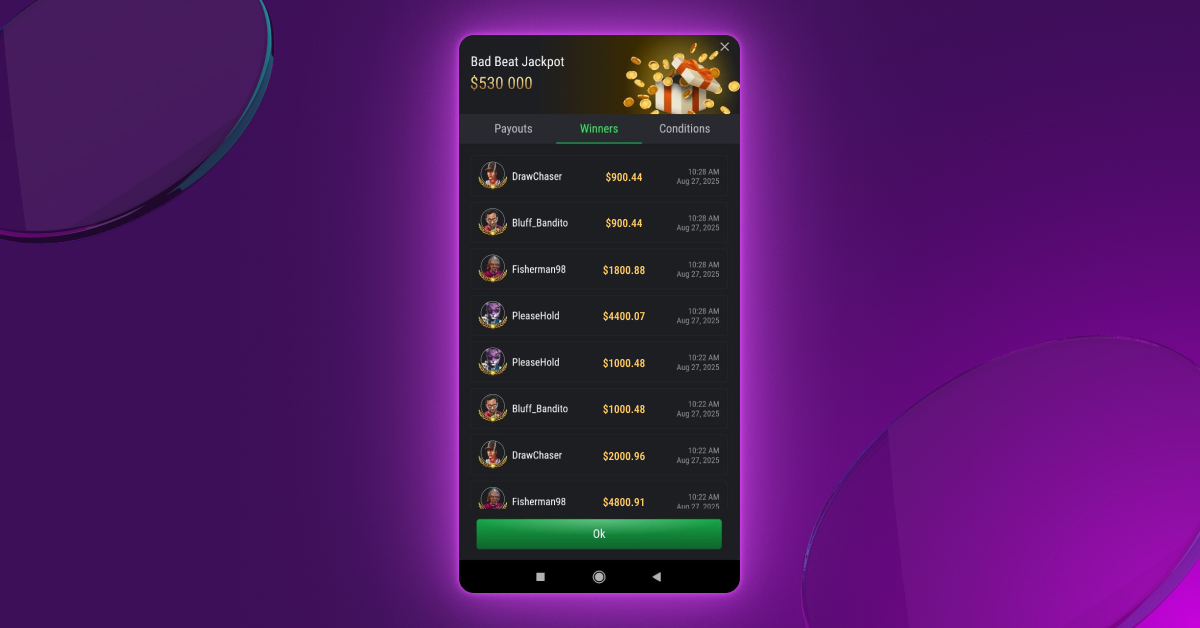
In-Client Jackpot Details
Players can now view detailed jackpot information by clicking the jackpot banner in the lobby or at the table. A popup window displays three tabs:
- Payouts: Shows recent jackpot distributions.
- Winners: Lists the 10 most recent jackpot winners.
- Conditions: Displays the current criteria required to win the jackpot.
Web Client
- New GA4 Event — Refund Failure Tracking: A new refund_failed event has been added to Google Analytics (GA4) to track failed transactions during cashout or refund attempts. The event includes key parameters such as value, currency, transaction ID, and payment system details, helping to improve visibility into failed payment flows.
- Localization Update: German language localization has been revised and improved for greater accuracy and consistency.
Clubs
- Infinite Balance Display for Clubs and Unions: A new option allows displaying an infinite balance for clubs and unions. When enabled, the balance is shown with an infinity symbol, and the option to add funds is hidden. This helps clearly indicate that the balance is not limited by a specific value. The feature is controlled via system configuration settings and can be enabled separately for clubs and unions.
Back-Office
- New Option for Deposit Wagering in Poker: A setting has been added to the Money Limits section allowing deposit wagering to be calculated based on rake and tournament fees (Entry Fee, Rebuy Fee, Add-on Fee), rather than bets. This applies to both cash games and tournaments, ensuring a more accurate reflection of player activity for wagering requirements.
- Improved Navigation in Cashout Reports: In the Pending Cashout Transactions report, clicking a player’s username now redirects to the full User Details page instead of the limited Player Info view. This provides quick access to all relevant tabs, such as Transactions, Session History, and Fraud, aligning navigation behavior with other admin sections.
- Unified Notification Type Field: Push Type has been removed. Notification type is added. Presented as a dropdown, it is available for all notification types and includes the following values: Monetary, Alerting, Informational, and Support.
Payments
- New Payment Aggregator — Utorg: The Utorg payment system has been integrated as a new aggregator for processing deposits, expanding available options for cryptocurrency and fiat transactions.
Updates 25.7.1
05.07.2025
Leaderboards
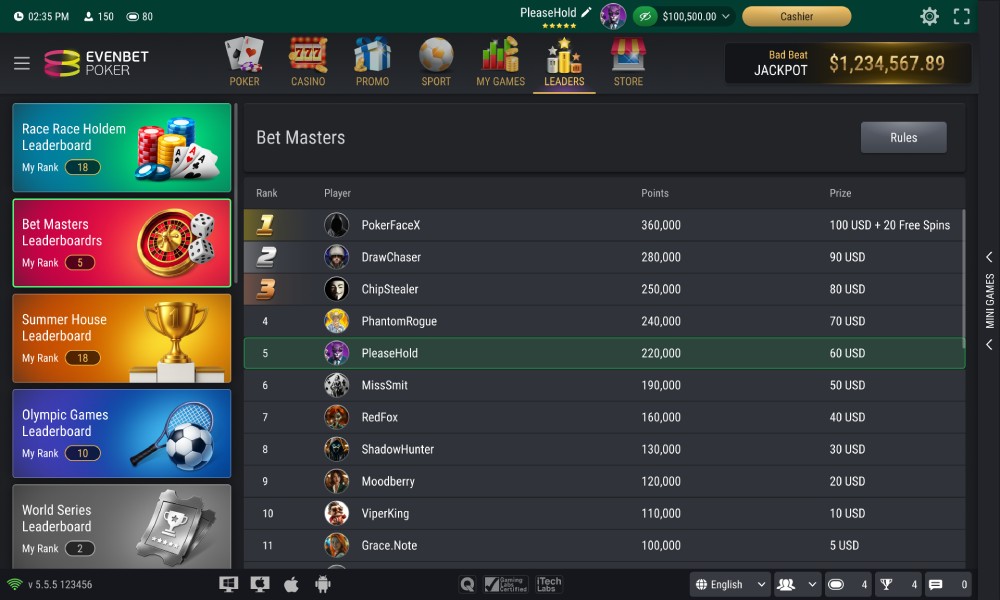
A new Leaderboard feature allows players to compete for rewards by completing tasks, with real-time rankings displayed in the client. The “Leaders” section displays all active leaderboards, participant standings, accumulated points, and potential prizes.
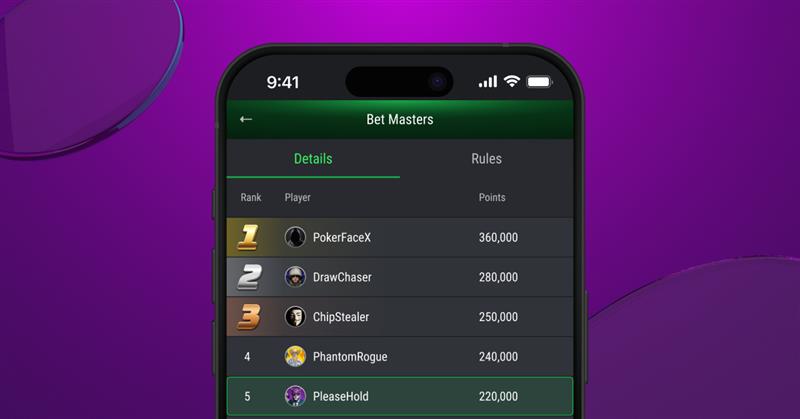
Operators can configure a wide range of leaderboard formats, for example:
- Rake Race: Players earn points based on the amount of poker rake they generate — the more rake, the higher the score.
- Hand Race: Points are awarded for every hand played at qualifying poker tables, encouraging consistent participation.
- Casino Tournaments: Players receive points for making bets in casino games. The more they wager, the more points they accumulate.
Leaderboard logic, task conditions, reward rules, and visibility are managed through the Promo module in Back-Office. Prizes can be credited automatically or may require wagering, depending on campaign settings.
Core Updates
- Expanded Hand-for-Hand Configuration: Hand-for-hand activation can now be configured based on the number of prize places and table size, allowing for more precise tournament setup.
- Run It Multi-Times Exclusion for Insured Players: It is now possible to determine whether a player who purchased insurance can choose to trigger the Run It Multi-Times option. In other words, if a player has purchased insurance, the Run It Multi-Times option will not be available to them.
- Improved Phase Progression Notifications: A new configuration enables clear pop-up notifications for players who qualify for the next stage in multi-phase tournaments. This improves user experience and clarity around tournament advancement.
Web, Desktop, and Mobile Clients
- Table and Tournament Creation Removed: All functionality related to creating tables and tournaments has been fully removed from client applications.
- New Rubies Section in Cashier: A dedicated section has been added to the Cashier, allowing players to purchase virtual currency (rubies). Rubies can be used in the Store to buy items as an alternative to real-money payments.
Web Client
- Persistent Push Notifications: Push notifications can now remain visible until the player either confirms reading them or logs out. This behavior is controlled by the “Confirmation Required” option in Backoffice and is currently supported only in the web client.
Clubs
- Cut the Deck Option for Cash Tables: A new “Cut the Deck” option is now available when creating club cash tables. Its visibility is controlled by a configuration setting and can be enabled on request. When active, the option appears in the Create Game form, allowing organizers to offer an experience closer to real-life poker.
Back-Office
- Recipient-Based Search in Notifications: The Message List filter in the Notification Management section now supports searching by recipient data, such as phone number or email. This makes it easier to find specific messages sent to individual players.
- Configurable KYC Verification Rules: It is now possible to define which KYC document or information (email, phone number, address) blocks must be approved for a player to complete identity verification. When configured, the system assigns verified status only after all specified blocks have been approved, allowing for more precise compliance control.
- New Club Information Columns: The following pages now include additional columns displaying whether the tournament or table is associated with a Club, along with the corresponding Club ID:
- Active Tournaments
- Tournament List
- Active Tables
- Table List
- Custom CGP Coefficients for Game Creation: You can now set specific CGP coefficients for individual tables or tournaments. This is especially useful when you want to award more points for certain games—for example, during a special sponsored tournament.
Casino
- New Casino Provider: NardsClub.
API
- Cancelling Player Registration in Tournaments: A new API method allows operators to unregister players from specific tournaments. This provides greater flexibility in managing tournament participation outside the poker back office.
- Player Statistics Retrieval: Two new endpoints have been introduced for accessing player statistics. One returns aggregated data for multiple players based on selected criteria; the other provides detailed statistics for a single player. These endpoints support advanced reporting and player behavior analysis.
- Buy-In Limits for Cash Tables: A new parameter in the “Create Table” method allows you to specify a predefined buy-in table instead of setting minimum and maximum amounts manually. This ensures that buy-in rules are applied consistently across the platform.
Payments
- USDT (TRC-20) Support for Ethereum: The Ethereum payment system now supports the USDT token on the TRC-20 network, expanding the range of available token options for deposits and improving flexibility for crypto users.
Promo Engine
- Updated Reward Wagering Logic: New options offer more flexible control over how wagering progresses when a player’s participation is interrupted.
Version 25.6.2
15.06.2025
Run It Multi-Times
A new cash game feature allows remaining community cards to be dealt 2, 3, or 4 times when all players are all-in. This reduces variance and increases the chance of splitting the pot — especially popular in high-stakes games and among professional players seeking more consistent outcomes.
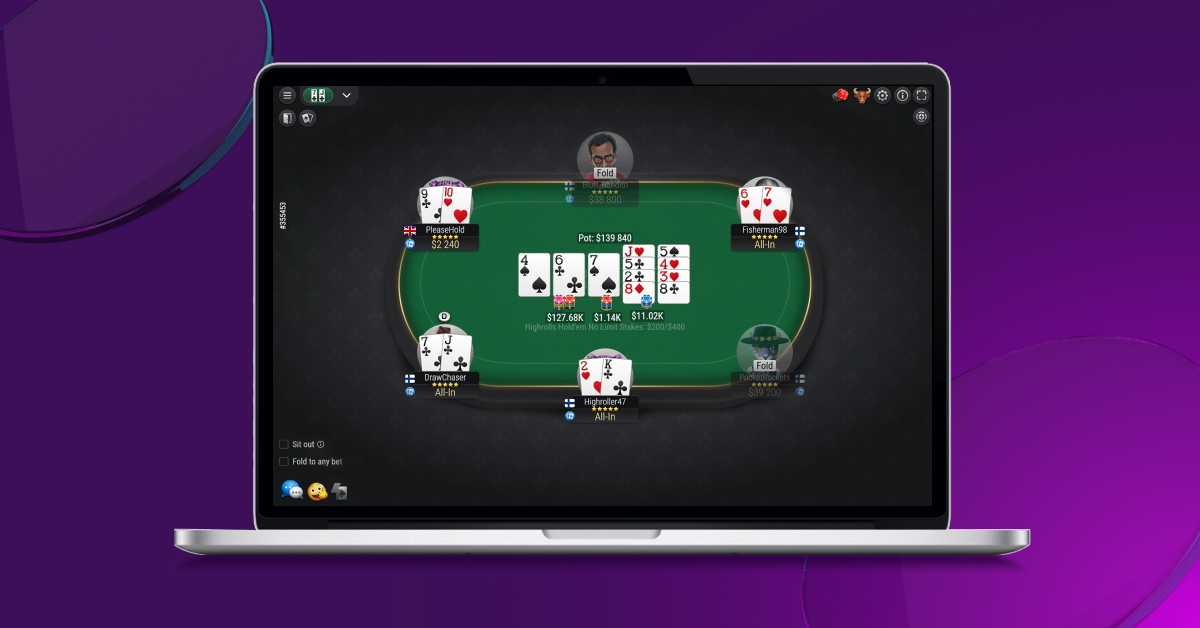
- Activation Modes:
- Players pre-select the option to enable multiple runouts.
- Multiple boards are dealt automatically when a player goes all-in.
- When all-in occurs, one player is prompted to choose the number of runouts. Other players must confirm. The prompt appears only if both sides have a chance to win.
- Configuration: Activation mode and number of boards are defined during table setup.
- Supported Game Types: Available at No Limit and Pot Limit cash tables for Hold’em, Omaha variants (including Hi/Lo and 5/6 card), Short Deck Hold’em, Triton Hold’em, Courchevel, Pineapple, and Telesina formats.
- Restrictions: The feature is not triggered if the river has already been dealt or if further betting is possible.
Core
- Face-Up Hands at All-In Showdown: New configuration settings control whether all player hands are revealed at showdown when at least one player is all-in.
Mobile Clients
- Main Screen Icon Layout Optimization: The user interface has been adjusted to ensure that at least 10 icons are visible simultaneously on the main screen, improving navigation and overall usability on mobile devices.
Back-Office
- Manual Deposit Tracking in Action Logs: Reports in the Action Log section now include entries for deposits manually created by administrators via the Back-Office. This applies to both the Action Tracking Items List and All Changes reports, enhancing transparency and auditability of manual transactions.
Clubs
- Renamed Fields for Clarity in Game Setup: In the client interface for Clubs, the fields “Rebuy chips” and “Add-on chips” have been renamed to “Rebuy cost” and “Add-on cost” during game creation. This change clarifies that the values represent the price, not the number of chips, reducing confusion for organizers.
Casino
- New Casino Providers Integrated:
-
- Gametech
- GoSlots
- iDG.
Payments
- New Payment Systems Integrated:
- BillBlend
- Payadmit
- Configurable Notes Formatter for Transactions: A new “Notes Formatter” tab has been added to the Payment System settings in Backoffice. It allows administrators to define which fields (e.g., payment system name) should be included in the transaction notes. The resulting formatted notes appear in the Transaction Info → Linked Notes section, offering greater control and consistency in transaction record-keeping.
Promo Engine
- New Reward Unlock Strategies for Rewards Wagering: Two wagering modes are now available when multiple rewards are active under the Wagering for Money mechanism:
- Parallel Wagering Strategy: Parallel wagering involves placing multiple individual bets at the same time, either on different outcomes of a single event or across multiple events, to spread risk or capitalize on various scenarios
- Sequential Wagering Strategy: Refers to a systematic approach where bets are placed one after another in a deliberate order, often based on the outcomes or developments of prior bets, to manage risk, lock in profits, or capitalize on evolving game situations. Unlike parallel wagering, where multiple bets are placed simultaneously, sequential wagering involves a step-by-step process, with each bet informed by the results, odds changes, or circumstances following the previous wager.
Version 25.6.1
15.06.2025
Core
- New Security Permission — System Player Registration: A new permission has been added to allow complete disabling of user registration across all platforms. This can be used to temporarily suspend registrations due to technical or legal reasons.
- HUD Setting for Cumulative Player Stats: A new configuration option enables the HUD to display real-time cumulative player statistics across all sessions, instead of resetting them at each table.
Web, Desktop, Mobile Clients
- Purchase Confirmation Notification: After a successful product purchase via the Payment system method in the Store, players now receive an internal push notification confirming the completed transaction.
Web Client
- New GA4 Event — Join Cash Table: A new analytics event tracks successful player seatings at cash tables, helping to better understand user behavior. The event includes parameters such as game type, table features, stakes, currency, and table ID.
- Improved Reconnection Feedback: A new animation is shown during connection loss, indicating that the app is attempting to reconnect. If reconnection fails, a “Reconnect” button is displayed to let the player manually retry.
- Localization Updates: New and updated translations have been added for
- French,
- Hindi,
- Arabic,
- Polish,
- Russian.
- Connection Lost Animation and Manual Reconnect: During a lost connection, a new animation now indicates that the app is attempting to reconnect. If reconnection fails, a “Reconnect” button appears, allowing the player to manually retry.
Back-Office
- Role-Based Access for Responsible Gaming Limits: New Backoffice privileges have been added to manage user limits in the Responsible Gaming section on the User Details page. These permissions provide more granular access control for support and compliance teams.
- View: Grants read-only access to existing Responsible Gaming limits.
- Edit: Allows authorized users to edit and delete player-defined limits.
Casino
- New casino providers:
-
- Champion
- Clawbuster
API
- New Parameter — Game Mode: A new optional gameMode parameter has been added to seamless requests, indicating whether the game is a cash game, spin tournament, sit & go, or regular tournament.
- Scaleo Affiliate Integration: Integration with the Scaleo affiliate system has been enhanced. Scaleo can now fully replace the built-in affiliate system (both systems cannot work simultaneously). New players registering with a Scaleo promo code are automatically assigned within the Scaleo platform. No affiliate tracking occurs on the EvenBet side. This feature is optional and requires custom integration work to enable.
Payments
- New Payment Aggregator: Payadmit has been integrated as a new payment aggregator, expanding the available options for transaction processing.
Promo Engine
- New Promo Task — Card Combination: A new task has been added to reward players who win a game with specific card combinations. Combinations can be listed in standard poker notation and may include wildcards to target suits.
Version 25.5.2
30.05.2025
Hold’em and Omaha Tabs for Better Navigation
Separate tabs for Hold’em and Omaha — the most popular poker formats — have been added to the web, mobile, and desktop clients to streamline navigation between game types. The tabs are shown only when active tables of the corresponding type are available, while the “Cash Games” tab remains unchanged and displays all tables. Tab visibility is configurable and can be enabled upon request.
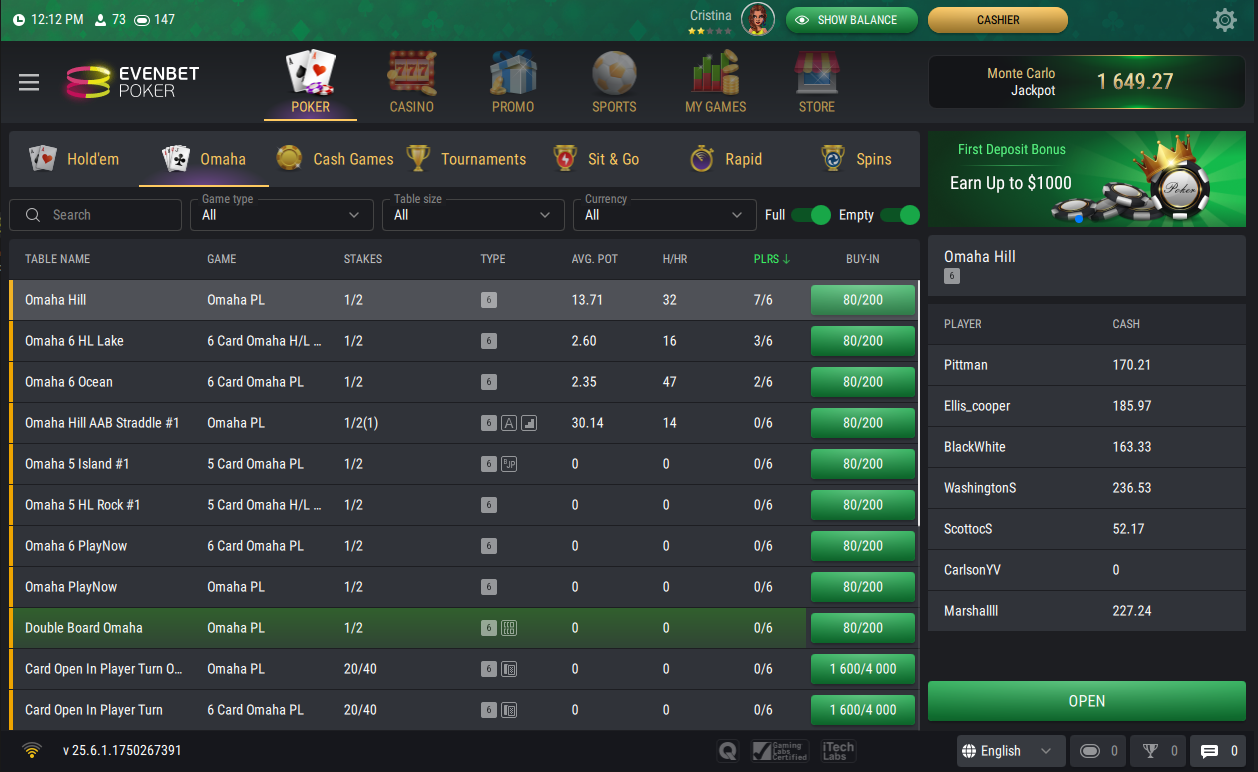
Core
- Tournament Completion Event Update: The tournament сompletion event now includes two additional parameters: skin ID and money type. This provides more context for analytical and operational use.
Web Client
- Updated GA4 Analytics for Game Tabs: GA4 screen view events have been refined to better reflect player navigation between Hold’em and Omaha in the lobby. This improves the accuracy of behavioral analytics and supports more detailed traffic segmentation.
Web, Desktop, and Mobile Clients
- Tournament Bet Cap and AOF Labeling: The tournament info section now displays the Bet Cap — the maximum risk per hand in All-in or Fold tournaments. A new AOF icon has been added to the tournament list and detailed view for better recognition.
- Sit-Out Option Tooltip: The “Global Sit-Out” checkbox now includes a tooltip clarifying that it applies to all currently active tables.
Desktop and Mobile Clients
- New Game Mode — Cucurucho: The Cucurucho game mode is now available in desktop and mobile applications.
Backoffice
- Cash Drop Minimum Players Visibility: The minimum number of players required to trigger the Cash Drop feature is now displayed on both the Table View and Table Info pages, making the requirement easily visible to administrators.
Casino
- Currency Precision Support in Game Launch: A new optional currency precision parameter is now included in real game launch requests when enabled in Backoffice. This ensures providers receive accurate decimal formatting for in-game currency.
API
- Email Validation with NeverBounce: The email verification service NeverBounce has been integrated to validate email addresses during user registration.
Payments
- New Payment Systems:
- Heropayments
- Paysafe
- Ethereum Deposits — Multi-Network Support: The Ethereum deposit flow now supports BNB Smart Chain, Ethereum, and Tron networks for USDT and other tokens. Users can select their preferred network in the Cashier interface. Supported networks and token parameters are configured in Backoffice.
Promo Engine
- Improved Promo Campaign Workflow: After creating or editing a campaign, task, reward, or delivery rule, users remain on the same page and see a success message — streamlining the promo management process.
Version 25.5.1
15.05.2025
Rakeback Progression System
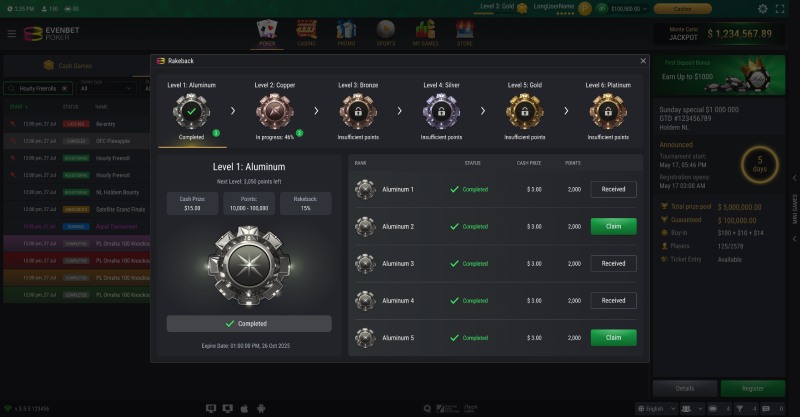
A more flexible rakeback system has been introduced, configurable through the Promo module. This system allows for multi-level progression with rewards at each stage and time restrictions for players to meet rake targets.
Each level can feature multiple stages, and upon completing all stages of a level, players can move to the next level. Conversely, failing to meet the rake requirements within the time limit can result in a player dropping to a lower level. A dedicated widget on the client side displays the player’s current level, progress, targets, and rewards.
Picture-in-Picture Mode for Android Clients

Let your players stay in the game while multitasking. With the new Picture-in-Picture option in System settings, the poker table stays visible in a mini window.
The feature is currently available for the Android client, keeping the action going even when the app is minimized.
Cash Drop for Desktop and Mobile Clients
Surprise bonus chips, bigger pots, zero extra bets. Cash Drop randomly adds a room-funded bonus to the pot — no rule changes, just more action. A special animation highlights the drop before the hand begins.
Now available on both desktop and mobile clients, it drives engagement and boosts rake across Hold’em, Omaha, and more.
Learn more in the Version 25.4.1 release notes.
Core
- New Game History Events: Game History now records new events.
- Return Cash: The event is for any cash withdrawn from the table, including partial withdrawals, with the amount specified. This event is also reflected in the replay.
- Tournament Completed: The event now includes two new parameters: externalId and externalCode.
- Player Block Status Update: The event now includes a new parameter. When it is true, a soft block/unblock is applied — meaning the action is deferred to avoid interrupting the player’s ongoing activity (e.g. a tournament).
Web, Desktop, and Mobile Clients
- Omni-channel Settings: Most client settings, like Table Settings and Rate Settings, are now saved to the account and shared across web and native apps, making it easier for players to switch devices while keeping their familiar settings.
- Casino Section Filters Improvement: Filters were updated to improve usability and consistency.
- Games Tab: Provider filter added.
- Categories Tab: After selecting a category, a provider filter is available that shows only providers for that category; on mobile, the category filter was removed.
- Providers Tab: After selecting a provider, a category filter is available that shows only categories for that provider; on mobile, the provider filter was removed.
- Overall filter UI was improved on mobile devices.
Web Client
- New Dealer Tips Design and Animations: A brand-new design and animations have been introduced for the dealer at tables with Dealer Tips feature. When a tip is sent, the dealer now plays one of four new animations at random, enhancing the overall table experience.
- New GA4 Events for Cashier: These events are designed to track user behavior during deposit actions and cashout requests.
Casino
- New Casino Provider: Panga Games.
- GameArt Integration Improvement: Freespin support has been added for the GameArt provider.
- Premium Game Attribute: A read-only attribute indicating whether a game is marked as Premium by the provider has been added. It is displayed on the Casino Game list and game view/edit pages and cannot be edited.
API
- Unified IP Rate Limiting: Unified IP rate limiting has been implemented for API methods. Default limits are applied to all methods unless custom values are configured. The following parameters can be set per method:
- Number of allowed requests
- Time period during which requests are blocked after the limit is exceeded
- Spend Date for Ticket Entity: The spend date field has been added to the ticket entity in API responses. It shows the date when a ticket was used by the player. If the value is null, the ticket has not been used.
Payments
- New Payment System: Skrill.
- Improvements for the FortaPayments: FortaPayments now allows configuring the same payment provider multiple times for different currencies. Each instance can have its own settings, enabling the same payment method to be used with different currencies simultaneously.
- Improvements for PayForYou: PayForYou now supports multi-currency configuration. The module in the Back-office has been refactored to the aggregator type. It is now possible to create a separate provider for each currency, with individual settings for API Token and Signature Key.
Promo Engine
- New Promo Task — Casino Multiplier: A new promo task checks if the player’s total win in a round is greater than their initial bet by N times or more. The minimum multiplier is configurable, and the task is completed even if the actual win exceeds this value.
- Mass Rollback: Mass rollback of promo rewards is now available on the Players Rewards page. Administrators can select multiple rewards and rollback them with a single action.
Version 25.4.2
02.05.2025
Core
- Country Selection During Registration: A new setting has been implemented: when enabled, the country selected by the user during registration takes priority over the country detected by IP. This allows registration to proceed even if the user’s IP-based country is incorrect, as long as the selected country is allowed.
Back-Office
- Post Late Registration Level Time Option: New tournament option allows configuring the duration of the level that follows the end of late registration, providing more control over tournament structure at this stage.
Casino
- New casino providers: Timeless Tech and Hacksaw Gaming were integrated.
Payments
- New Payment Systems Integrated:
-
- JDpay
-
- Payllion
-
- LokiPay
-
- M-Pay
- New Auto Payout Disabling Option: A new setting has been added to the Payments Systems. When enabled, the system blocks automatic cashouts for players who have played poker with real money and generated rake through real money games since their last successful cashout. For platforms including both casino and poker games, this setting allows automatic cashouts for casino players and prevents potential fraud in poker games.
- PayStar Integration Improvement: The integration with PayStar payment system has been improved to support routing payments based on player groups, allowing different processing rules to be applied for each group. Card details (token, mask, and cardholder name) are now saved after the first deposit, enabling repeat payments without re-entering card information.
Version 25.4.1
15.04.2025
New Cash Table Game Mode — Cash Drop
Cash Drop adds surprise bonus chips to the pot in random hands, funded entirely by the room. No extra bets are required from players — just more action and bigger pots. It boosts engagement, increases rake, and works across popular formats like Hold’em and Omaha. Combine it with Bomb Pot for an even more dynamic experience.
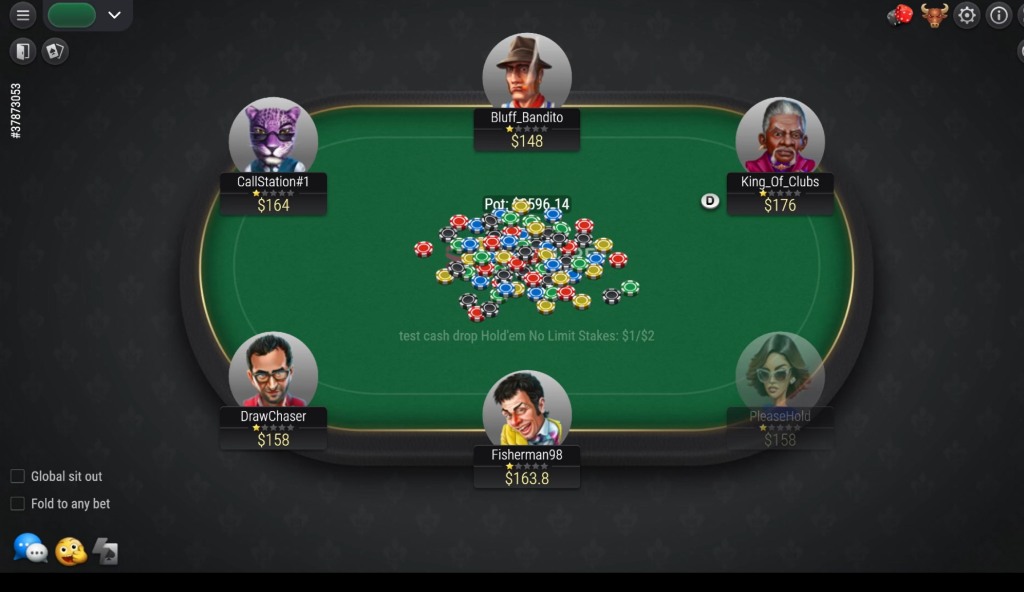
After a random number of hands (within a set range), a bonus amount — also randomly chosen within a defined range — is added to the pot at the start of the hand. This only happens if the required minimum number of players is seated.
The hand proceeds like a normal one, with no changes to the rules. A special animation shows the bonus being dropped before cards are dealt.
Cash Drop is enabled during table creation and can be used alongside Bomb Pot mode. Supported game types: Hold’em, Omaha 4/5/6 (including H/L), Courchevel, Pineapple, Short Deck, and Triton.
Core
- Tournament Level Configuration Update: The tournament level configuration now supports the all-in value for the ante. When set, all players at the table are required to go all-in whenever they post the ante, not just those in the blinds. This enhancement allows for the creation of levels with mandatory all-in play, supporting more intense and accelerated tournament finishes.
- Game Replay Player Participation Check: A new configuration setting allowing to verify that the player requesting a replay actually participated in the hand. If not, the request is denied. The feature is aimed to restrict data mining.
- Tournament Notifications Order Control For Hand-for-Hand Mode: A new configuration setting controls the order of tournament notifications when Hand-for-Hand mode starts. When disabled, players who bust right before Hand-for-Hand will immediately see a message about their elimination and place. When enabled, the Hand-for-Hand notification appears first, and the elimination message is delayed until other tables finish.
- Time Bank Logic Improvement: This improvement modifies the time bank work in games with non-betted ante. When the setting is disabled, the time bank won’t activate automatically after a non-betted ante. Instead, if the turn timer runs out after the ante, the system will perform the auto action. However, players can still manually activate the time bank by clicking the button.
Web, Desktop, Mobile Clients
- Flight Tournament Lobby Prize Pool Improvement: The Prize Pool block has been updated to provide clearer and more relevant information. Under the prize pool amount a tooltip provides context on how the current phase ends.
Clubs
- Joining A Club UX/UI Improvement: Now, when a player applies to join a club and is waiting for approval, the club title is greyed out with the message “Waiting for confirmation”, making it easier to identify the pending application status.
Back-office
- UI Improvement In The User Details Section: Long comments are now displayed in multiple lines, with the comment box automatically adjusting its height to fit the text, improving readability.
- UI Improvement For Balance Section: The balance table now hides any row where all currency values are zero, helping reduce visual clutter. If no rows remain after filtering, the message “No active balances available” is shown instead.
- Language Sync With Customer.io: A new attribute and event were added to support email localization. If configured, the selected language in the product is synced with Customer.io to send emails in the appropriate language.
Payments
- New payment system: Help2Pay.
Version 25.3.2
02.04.2025
Table Toolbar
The new collapsible table toolbar enhances multi-tabling with faster access and improved control. Located at the top of the table interface, it displays a scrollable preview of all open tables, allowing players to switch between them effortlessly.
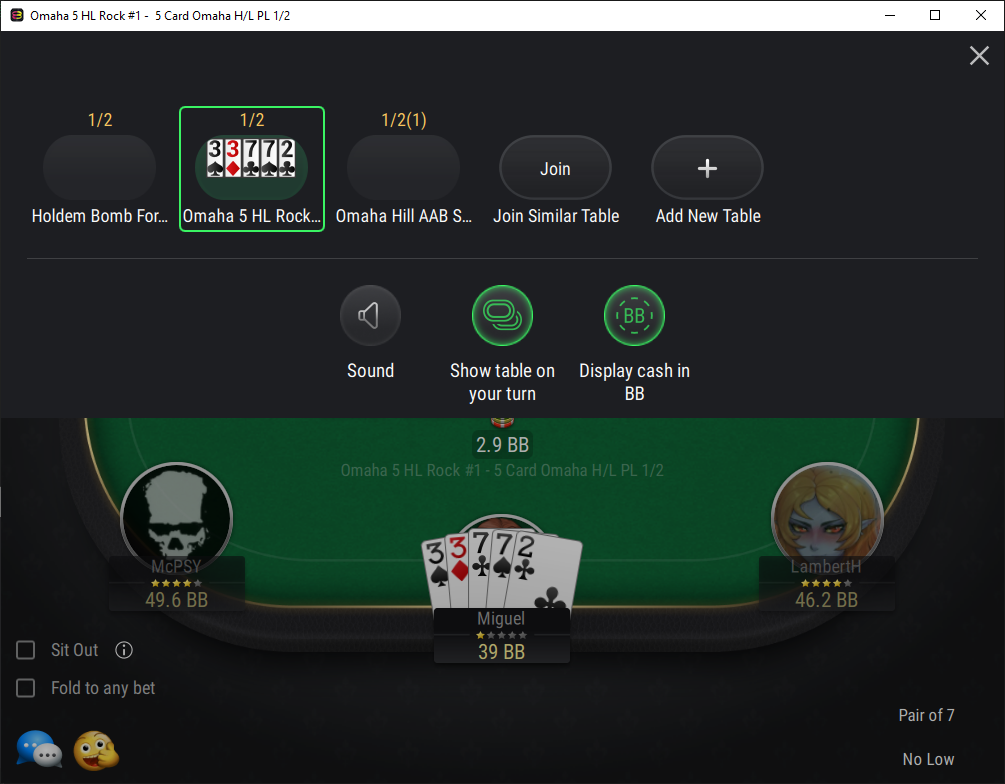
A right-click (or long tap on mobile) on a table preview opens a quick menu with essential options: Sit Out, Back to Lobby, and Leave Game. When expanded, the toolbar shows additional details such as table name, stakes, and buttons to Open a New Table or use Join Similar to find a comparable game automatically.
Key settings like Sound Toggle, Stack Display (in BB), and Show Table on Your Turn are now accessible directly from this panel, synced with the general Settings section. On mobile, the toolbar also displays active jackpot pools for quick reference.
Additionally, the table layout has been refined to improve usability: Hand History and Leave Game buttons have been moved from the menu to the table view for quicker access.
This upgrade significantly improves the user experience—especially in multi-tabling mode—by simplifying table navigation and providing instant access to key game controls and information.
Core
- Exchange Rate Information: Exchange rate information is now included in Get Cash and Return Cash requests for tables and tournaments where the currency differs from the external system.
Web client
- Localization Improvement: The Portuguese localization has been updated.
API
- New Password Recovery Endpoint: A new GET endpoint has been added to check whether password recovery links from notifications (such as email verification, password change, etc.) are still valid. This allows showing an expiration message immediately when the password reset page is opened, instead of after submitting the form.
- Descending Sorting for Promotions Extension: Descending sorting by the “Order” field is now supported in the API to control promotions listing.
- New Rollback Request Option: An optional parameter has been added to the Rollback request. Previously, a rollback automatically closed the round, which blocked further transactions. Now this behavior can be controlled using the new parameter.
Payments
- New Payment Systems:
-
- BSPOK payment provider
- PayAlma
- Auto-Limits Transfer Update:
- Transfer auto-limits now support two modes. In default mode, if the transfer amount exceeds the limit, the system may try to process the operation later. In strict mode, transfers are immediately blocked when a limit is exceeded, and the user receives a clear explanation.
- The new GET endpoint now shows how much can be transferred immediately, the applicable daily, weekly, and monthly limits, and which limit type was used.
- The new POST endpoint uses this data to validate transfer requests more accurately and reject them immediately in strict mode if needed.
Promo
- Betsy Integration Update: Support for external freebets issued via the Betsy provider has been implemented. A new setting has been added to the Casino Provider Settings page in the Back-office. The system now recognizes and processes external freebets, allowing players to place bets with them and receive winnings to their cash balance.
Version 25.3.1
15.03.2025
New Cash Table Game Mode — Cucurucho
The Cucurucho mode adds a dynamic twist to cash game poker with two dealer buttons: the standard Dealer button and the Cucurucho button. The game follows regular play until the Dealer button reaches the same player as the Cucurucho button, triggering a special Cucurucho hand.
During this hand, all players must pay an Ante, a mandatory bet set as a multiple of the big blind. If a player cannot cover the Ante, they automatically fold. Once the flop is dealt, those who have paid must decide whether to continue by matching the full pot size or fold. If they cannot cover the amount, they must either add more chips or exit the hand.
The remaining players reveal their cards, and the turn and river are dealt, similar to an all-in scenario. If all but one player fold, the last standing player wins the pot. Otherwise, a showdown determines the winner.
After the Cucurucho hand concludes, both buttons move to their next positions, and the game resumes in standard mode. This format increases pot sizes and strategic depth, creating high-stakes, action-packed gameplay.
Supported game types: Hold’em, Short Deck Hold’em, Omaha 4/5/6, Omaha 4/5/6 H/L, Courchevel, Pineapple, Triton.
Confiscation & Compensation Transactions
This feature allows Back-office administrators with sufficient rights to confiscate funds from player accounts and redistribute them as compensation, typically in response to fraud-related incidents.
- Confiscation: Backoffice administrators manually create confiscation transactions on the Confiscation Transactions page. The system enables administrators to specify the player, amount, and currency.
- Compensation: After confiscating funds, Back-office administrators can also create compensation transactions to reimburse affected players. These transactions are linked to previous confiscation records, where administrators select the players to reimburse, the amount, and currency.
Compensated players will see these transactions as “Refunds” in their transaction history in Cashier, while confiscation transactions remain hidden from players.
Implementing the feature demonstrates a readiness to respond promptly to incidents, which strengthens the room’s reputation and increases player trust.
Core
- Number Formatting Customisation: New configuration settings in the Money section allow customisation of number formatting for tournaments and the lobby. These settings ensure a consistent and customisable numerical format across all clients. In these settings, you can define digit grouping for tournament chips, set the separator for grouped digits, control digit grouping and the separator for lobby numbers.
- Configuration Update for Spin Tournaments: The configuration for Spin tournaments has been reworked to allow for more precise probability settings..
Web Client
- Localisation Updates: The following localisations have been updated:
- Spanish
- Italian
- Indonesian
- Brazilian Portuguese
- Chinese (Simplified)
- Japanese
- Thai
- Korean
- Turkish
Desktop Clients
- Tournament Lobby Minimisation: The tournament lobby can now be minimised in the desktop application.
- Tables Arrangement: When opening several tables in multitable mode, they now remain in the order they were opened. They now automatically arrange in a tiled view for better organisation and visibility. This applies to all table windows that the user has not manually moved or resized.
Website, Desktop, and Mobile Clients
- GA4 Support: Google Analytics 4 support has been added for native clients and Website projects.
Clubs
- Unions for Web Client: Unions are now available in the Web Client version of poker clubs. Unions allow multiple clubs to connect and share their player pools, enabling larger games and greater liquidity. Club owners can join or create a Union, giving their members access to tournaments and cash tables hosted by other clubs within the same Union.
Back-office
- Create Transaction UI/UX Improvement: Create Transaction Form on the User Details Page now closes automatically after a transaction is created, and a confirmation message is additionally displayed to indicate transaction success.
- New Responsible Gaming Notification Types:
-
- Self-Exclusion Activated – Triggered when a player activates a Self-Exclusion Responsible Gaming limit. The notification informs the player that the limit is in effect and displays the end date.
- Cooling-Off Activated – Triggered when a player activates a Cooling-Off Responsible Gaming limit. The notification informs the player that the limit is in effect and displays the end date.
- Event Attribute for Customer.io: A new attribute, “Player Group”, has been added for Customer.io. This attribute can be linked to an event in the provider’s settings, enabling more tailored event tracking and segmentation.
Payments
- New Payment Systems Integrated:
-
- PayStar
- D24
- libernetix
- CoinsFlow
- PayCord
- Defexa
- Xendit
- Improvements for the AntrPay Payment System: AntrPay now allows configuring the same payment provider multiple times for different currencies. Each instance can have its own settings, enabling the same payment method to be used with different currencies simultaneously.
Version 25.2.2
28.02.2025
New Side Game — Cowboy Hold’em
Cowboy Hold’em is an exciting side game that combines poker mechanics with casino-style betting, enhancing both engagement and revenue potential. Designed as an additional gaming option, it allows players to place bets without interrupting their main poker session.
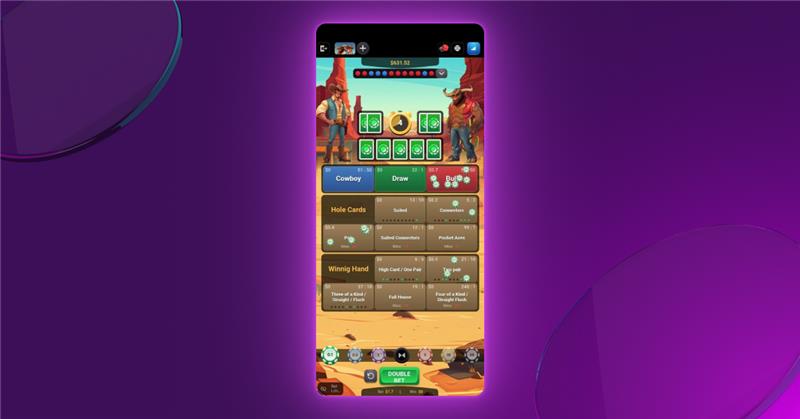
Set in a Western theme, the game features a virtual showdown between a cowboy and a bull. Players can bet on the winning opponent, predict a draw, or wager on specific poker hands and pocket cards. The lower the probability of an outcome, the higher the potential payout. Bet denominations and odds are customisable.
This game will not only enhance player engagement but also serve as an additional revenue stream for the poker operator.
Web Client
- New GA4 Events: A new set of Google Analytics 4 events related to Cowboy Hold’em mini-game has been added.
Casino
- New Casino Provider — The Fazi: The Fazi casino provider was integrated.
API
- Game Type Parameter: A new parameter, “game type,” is now transmitted in seamless requests. This allows tracking transaction data by different game types, such as Texas Hold’em, Pineapple Poker, Omaha, etc.
- Hand History Retrieving: A new method has been added to retrieve hand history for tables. This allows for better game analysis and faster event searching.
Payments
- New Payment Systems:
-
- PayStar.
- 24х7Pay
- Libernetix. Supported currencies: AZN, KZT, VND, INR, CAD, CRC, MXN, PAB, BRL, COL, PEN, CLP, USD.
- Defexa. Supported currencies: BTC, ETH, USDT (ERC-20, Polygon, Solana).
- A-Pay. Supported currencies: BDT, INR.
- Payment Options for Verified Users: Payment options for verified users (Transfer Daily Auto, Transfer Weekly Auto, Transfer Monthly Auto) have been added to the Default Limit Values page. By selecting the corresponding checkboxes, auto-limits can be configured for verified users.
- Payment System’s Currency Limits: It is now possible to set limits in the payment system’s currency (e.g., CAD, EUR) instead of only in USD. This eliminates the need for manual currency conversion and helps prevent transaction declines due to exchange rate fluctuations. A “Limits” tab has been added to the Payment Systems page, along with a “Use payment system limits” checkbox on the Main tab. When the checkbox is enabled, the limits set in the “Limits” tab will be applied, ensuring a more stable and user-friendly deposit and withdrawal process.
Promo Engine
- Wagered Reward Manual Acceptance: Manual acceptance of wagered reward portions is now available. After a reward portion has been wagered, the funds will be credited to the player’s balance only after they press the relevant button in the application.
- No-Reward Tasks Displaying: Now it is possible to allow tasks without rewards but necessary for dependent tasks to be displayed to users.
- Undelivered Reward Rollback for Tickets: For the “Ticket” reward type, the “Rollback Undelivered Reward On” option has been implemented. When triggered, any undelivered Ticket reward is canceled.
Version 25.2.1
14.02.2025
Card Squeeze
Card Squeeze introduces an interactive way for players to reveal their hole cards, replicating a common action in live poker. Cards appear face down, and players can gradually uncover them with a squeezing motion, adding an extra layer of engagement.
The feature enhances gameplay by providing a more dynamic and immersive experience.
Core
- New Notification Provider — MessageWhiz: This is an SMS provider.
Web Client
- New Events for GA4:
-
- Dealer Tips Use: This event is triggered when a player sends a tip to the dealer at the cash table.
- Tournament Registration Pop-Up Link Share: It is now possible to copy and share a direct link to a specific tournament registration pop-up.
Web, Desktop, and Mobile Clients
- New Cash Table Filter — Stakes: The cash table filter “Stakes” allows players to filter the list of tables by stake levels, grouped into Micro, Low, Medium, and High categories.
Back-office
- New Comments Privileges: New Back-office Role Privileges for Comments on the User Details Page: view, add, edit, and delete.
- Wagering Left Column: In the Rewards section of User Details, a new column “Wagering Left” has been added for the following reward types: Money, Financial Limit, Casino Free Bet, and Casino Free Spin Package, when wagering is required. This column shows the remaining amount to wager.
- New OpenID/OAuth2 Providers Module: A new “OpenID/OAuth2 Providers” module has been added to Back-office under the Configuration section. This module allows adding and configuring OpenID/OAuth2 Providers to enhance Back-office login security and reduce the risk of unauthorised access. It serves as an alternative to the standard username/password login, offering a more secure authentication method. Currently, KeyCloak is integrated as the provider for Identity Management in Back-office.
- New Columns for Device List Section: Device List section, new columns have been added:
- External ID – displays the external ID of the user.
- Device Status – shows one of the following statuses:
- Active – login and registration are allowed for the device.
- Login Disabled – only login is restricted for the device.
- Registration Disabled – only registration is restricted for the device.
- Login and Registration Disabled – both login and registration are restricted for the device.
- Customer.io Skin Configuration: Customer.io configuration has been updated to support skin-specific configurations. It is now possible to set up different settings for different skins. This ensures that users on different skins are tracked separately.
Payments
- New Payment Systems Integrated:
-
- PayForU
- ChatlPay
- Celcoin Integration Update: The Celcoin payment system has been updated and now also supports withdrawal requests.
Promo Engine
- New Promo Type — Quest: When this type is used for promo campaigns, they can be displayed under a dedicated tab on the client side, separate from the default promo tab.
- Earned Point Detailed Displaying: In promo cards on the client side, Earned Points are now displayed as X CGP / Y CGP, where X is the current number of points earned towards the next payout, and Y is the required number of points for the payout. This is shown only for the Wagering delivery rule (points earned through rake). For the Wagering delivery rule, Earned Points are no longer displayed.
Version 25.1.1
04.02.2025
New Open Face Chinese Poker Modes: Ultimate & Jokers
Three new modes for Open Face Chinese Poker (OFC) have been implemented: “Ultimate”, “Jokers”, and their combination “Ultimate + Jokers”.
- “Ultimate” follows the same rules as “Progressive”, but in the Stay in Fantasy Land phase, the number of cards dealt always matches the number of cards received when first entering Fantasy Land. In “Progressive”, this number can decrease to 14.
- “Jokers” introduces two joker cards, which act as wildcards, enhancing the current row to the highest possible combination without causing a Foul.
These additions provide more variety and strategic depth, making the game more engaging for players.
Dealer Tips
The Dealer Tips feature allows players to tip the dealer, bringing a tradition from live casinos to online poker.
In offline casinos, it’s common for players to tip the dealer for good luck and gratitude, and this feature recreates that experience. Tipping does not provide any in-game advantage but serves as an additional source of income for the room.
Join Similar
Players can now quickly join tables with the same settings as their current table. To enable this, a “Join Similar” button has been added to the open tables panel on cash tables, allowing players to join tables with the same template.
This feature simplifies joining similar tables, improving the player experience.
Tournament Info Panel
A tournament info panel has been added, accessible by clicking the trophy icon on the tournament tables. The new panel provides all essential tournament details, including the time elapsed since the tournament started, prize information, blinds, the player’s current position in the tournament, and more. This feature enhances the player experience by offering quick access to key tournament information directly at the table.
This feature can significantly enhance the user experience for players using mobile devices, as they won’t need to leave the table and interrupt their game to view detailed tournament information.
Withdrawal Map
The Withdrawal Map is a payment management feature that allows administrators to set up withdrawal options based on the deposit methods players use.
For each deposit payment system, administrators can specify which withdrawal systems will be available as matching options. This ensures that players can only withdraw funds through the approved methods linked to their deposit method.
Core
- Rake Before the Flop: A new parameter was added to the main system configuration. When set to true, rake is taken before the flop at tables where a 3Bet (a second raise in the betting round before the flop) occurred.
Web, Desktop, Mobile Clients
- Additional Confirmation for Joining Table: An additional confirmation dialog for joining tables has been implemented for all game types in the Rummy, Big2, CallBreak, and Chinese family on PlayNow tables. When a player attempts to join a table, a pop-up appears with the message: “Are you sure you want to play this game?” This feature helps players avoid mistakes, boosts their confidence in their actions, and enhances the overall user experience.
- Global Sit-Out: Our software now supports two modes for the Sit-Out option: a Local Sit-out, which applies only to the table where it was activated, and a Global Sit-Out. The Global Sit-Out allows players to enter sit-out mode at all their tables (cash games and tournaments) simultaneously. When activated, the player enters sit-out mode on all tables as soon as it becomes possible.
Clubs
- Ante Customisation: A slider for setting the ante has been added to the club table creation for all game types except Rummy, Teen Patti, and Cowboy, allowing flexible ante customisation.
- “Cashier” Button Behaviour: The behaviour of the “Cashier” button in the tournament lobby has been adjusted. Now, for club tournaments, players are directed to the cashier of the specified club, while for global tournaments, they are sent to the global cashier.
Back-office
- New Player Segmentation Criteria: New assertion chain criteria have been added for Player Groups: Self-Exclude and Cooling-Off. These allow grouping players who have set these responsible gaming limits on their accounts.
- Tournament Ticket Notification: A new type of notification was implemented, triggered when a player receives a tournament ticket.
- Back-office Actions Logging Extension: The Action Tracking Items report now logs the following actions performed in Back-office improving security and accountability:
- assigning a role to a user,
- changing a user’s email,
- failed login attempt,
- login with two-factor authentication,
- changing payment system settings,
- administrator logging in as a user,
- unauthorised attempt to delete a user,
- successful addition of a role privilege.
- Add/Edit Product Page Update: The Add/Edit Product page has been updated: the “Tags” elements are now renamed to “Labels,” the button text changed from “Create Tags” to “Manage Labels,” and all related elements have been renamed accordingly.
- New Transaction Subtypes: New transaction subtypes have been added for the “Revenue Share” transaction type: “Club chips tournament entry” and “Real money tournament entry”, as well as a new subtype, “Tournament entry fee commission”, for the “Service Fee” transaction type. This update enhances transparency in transaction information and fee management.
- Verification Cancelling: The player profile now includes an option to cancel the verification of a verified player.
- Customer.io Language Synchronisation: Synchronisation of the notification language with customer.io settings was implemented. When a user selects a language in the product, the system automatically updates the corresponding language attribute in customer.io. This ensures that email notifications are sent in the correct language version.
- New Player Limits Privileges: A new resource, “Player Limits”, with the privileges “View” and “Manage”, was added to allow users to change default user limits and user limits.
Casino
- Game Banners Hiding: The system now supports hiding specific casino game banners for players from certain states.
- Free Spin Package TTL Notification: When setting up a Free Spin Package, administrators will now see a pop-up warning if the package has a time-to-live (TTL) — the duration before free spins expire. This ensures that administrators set the correct TTL from the start
- New Provider — FIRST Sportsbook: FIRST is a sportsbook software provider having offices in the UK, UAE, Malaysia, Singapore, Taiwan, Bulgaria, and Ukraine.
API
- Join Codes Linking: The option to link join codes to promo campaigns has been implemented, enhancing campaign tracking and management.
- Socure Integration: Integration with Socure via API, a service for identity verification and fraud prevention, has been enabled for different skins, improving security, automation, and compliance.
Payments
- New payment systems:
- Monetix,
- Multihub,
- XENDIT,
- 123 HUB,
- Coinsflow,
- Inwizo.
- TON Integration: TON blockchain was integrated with Telegram Wallet, enabling authorisation, wallet connection, NFT support, TON Coin, and Notcoin usage.
- Refund Event for GA4: A new event has been added for sending to Google Analytics 4. The refund event is triggered when the withdrawal process requested by the player is completed.
- Customer.io Deposit Tracking Improvement: A new attribute has been added to customer.io to track second and third deposits, allowing the marketing team to create user segments and set up targeted email campaigns based on deposit data.
- Check Country Only By IP Option: Added the ability to check a country only by IP in payment settings. Depending on the country restriction settings, payment systems may be excluded from the API response.
- Customer.io Cashier Type Tracking: A new attribute has been added to customer.io to track the type of cashier used for the last deposit, enabling the marketing team to create user segments and set up trigger-based email campaigns for different cashiers (Sports, Casino). Deposit data is accurately transmitted with each transaction, ensuring precise email campaign statistics.
Promo Engine
- Freebet for Betby: Freebet support has been added for the Betby provider. The External Template ID field has been added to the Add Reward (Freebet) page, allowing the setting of an external ID specific to this provider.
Version 24.12.2
15.01.2025
Core
- Bet Cap Option for Tournaments: A new Bet Cap option has been added for tournaments. It allows setting a maximum bet size in big blinds. The option can be enabled during tournament creation. This feature is available for the following game types: Hold’em, Shortdeck, Pineapple, all Omaha variations (including Hi/Lo and Courchevel), Mixed games, Draw, Razz, Stud, and their modifications.
Web Client
- Tournament Type Filter Reworked: The “Tournament Type” filter has been replaced with the “Format” filter in both the lobby and the My Games section. This filter now provides a summary of tournament type information along with any enabled modifications (e.g., Regular, Freeroll, Re-entry, Knockout). The filter is adaptive, displaying only the options for which active tournaments are currently available on the server. This update enables players to filter tournaments by all available formats simultaneously.
- Localisation Improvement: The Georgian localisation has been updated.
- Keyboard Controls: Keyboard navigation and controls have been added to the application. Use the Tab key to navigate through tabs, various lobby and table elements, and input elements such as text fields, checkboxes, select boxes, links, etc. Press the Enter key to activate the selected tab, interact with a selected element or submit a form.
Web, Desktop, and Mobile Clients
- UI Improvement: A new and improved UI for the icon representing the maximum number of players at the table has been introduced. The icon is displayed in the table list in the lobby and in the My Tables windows.
Desktop and Mobile Clients
- Guest Login: Guest Login is now available for Desktop and Mobile clients.
Clubs
- Commission Fee Setting: It is now possible to specify the commission fee directly when creating an MTT or SnG tournament. This fee represents an additional charge paid by club players on top of the tournament’s buy-in amount.
- Confirmation Requirement Message: For club cash tables with the “Require Buy-in Confirmation” option enabled, an informational message “Waiting for table manager to accept” has been added. This message appears when a player is waiting for the buy-in approval, informing them about the reason for the delay.
Back-office
- Player Email in Casino Transaction List: The Casino Transaction List report now features a “Player Email” column, making it easier to identify users by their email addresses.
- User Blocking Reworked: Options such as Block User, Ban User’s Chat, Kick User, and Freeze User are no longer available on the Edit User page. These functions have been moved and are now accessible exclusively in the User Details section.
Casino
- Freespin for Hub88: Freespin support has been implemented for the Hub88 casino provider.
Payments
- New Limit for Auto Payout: A new limit, “Disable auto payout for players who played poker with real money (cash game rake or tournament fees),” has been added to the Default User Limits section. When enabled, this setting blocks auto cashout for players who have participated in poker games (cash tables or tournaments) using real money since their last successful cashout. If auto cashout is active for the project and this checkbox is selected, the system performs an additional check during a withdrawal request to determine if the player has generated any rake or fees since their last cashout; if so, auto cashout is disabled for that transaction and it should be approved manually.
- Base Chain network for 0xproccesing: Base Chain network (ETH, USDC) is now supported by 0xproccesing.
- New Payment Systems: Piastrix, Kdpay, and Octopays payment systems have been integrated.